Shipping from UK NO TAX

Monday, 9 March 2020

Solved! Ford VCM2 IDS Testman Error

Offer the solution to Ford VCM2 IDS Testman error when diagnosing F – Series Super Duty.
Vehicle: F – Series Super Duty
Engine Type: Direct Injection – Turbo
Capacity: 6.0L
Transmission: Automatic
Fuel type: Diesel
Emission level: 50 state emission

Ford scanner to use: VCM2 running IDS software

Error:
Testman error 12 56 253662

IDS Testman Error Solution
obdexpress.co.uk solution:
You have to install IDS patch, download and install the patch here:
IDS Testman Error Solution 02

Good luck!

Wednesday, 4 March 2020

How To Get VCM2 IDS V86 Activation Code?

One user feedback his VCM2 IDS V86 need the activation code to active your license (shown as following image). One question, how to get the license?
Ids Activation Code 01
Ids Activation Code 02
Ids Activation Code 03
Ids Activation Code 04
Ids Activation Code 05
Obdexpress.co.uk engineer replied:
Because the patch is not installed, there is one patch in the CD.
Ids Activation Code 06

You can also watch the below youtube video:

Good luck!
Source:http://blog.obdexpress.co.uk/2020/03/05/vcm2-ids-v86-activation-code-how-to-get-it/

Tuesday, 24 December 2019

How to change GEM settings in Fiesta 2003 ?

How to change GEM settings in Fiesta 2003 ?
I need to check or change the settings of the GEM in an Fiesta MK6 (build 2003).
Anyone knows a software tool to do this?
I have an ELM327 (clone) adapter at hand. Also an UCDS interface.

There are two software tools to do this:
  1. IDS/VCM
  2. Forscan

In details:
Ideally you want IDS/VCM for this.
At this age you can do anything to this car using a VCM with Ford IDS v86 and C81 calibrations.
Advise the best VCM2 Ford IDS V101 (with double pcb, no wifi):
http://www.obdexpress.co.uk/wholesale/best-quality-ford-vcm-ii-oem-diagnostic-tool-ids-wireless.html
Vcm2 Change Gem Settings In Fiesta 2003 01
Vcm2 Change Gem Settings In Fiesta 2003 02

Capable alternative: Forscan  
ForScan is working fine. I had this, but an old version without capability to program. Downloaded the recent version from forscan.org and all worked like charm! This is a really great tool and all for FREE!

Another working alternative: FORScan Scanner clone
Test reports: China clone bought two days ago, but DTC, direct coding and other functions work.
Forscan Change Gem Settings In Fiesta 2003 03
Forscan Change Gem Settings In Fiesta 2003 04
Forscan Change Gem Settings In Fiesta 2003 05
Source: http://www.obdexpress.co.uk/wholesale/esl27-forscan-scanner-for-ford-mazda-lincoln-mercury.html

Sunday, 22 December 2019

Best VCM II Ford (SP177-C3): SP177 & SP177-C Best alternative

Ford VCM2 (SP177 & SP177-C) out of stock recently? obdexpress.co.uk released one best Ford VCM2 (SP177-C3), it will be the best alternative.
Here is one table comparing SP177-C3, SP177, SP177-C:
 SP177-C3SP177SP177-C
PCBClick hereClick hereClick here
WifiNONONO
IDS software (in CD)V106V101V108
UpdateYesYesYes
Price€ 194€ 177€ 159
In stockIn StockIn StockOut of Stock

SP177-C3 PCB:
[caption id="attachment_23945" align="alignnone" width="600"]Hq Vcm Ii Ford Pcb Sp177 C3 Hq Vcm Ii Ford Pcb Sp177 C3[/caption]

SP177 PCB:
Sp177

SP177-C PCB:
Sp177 C 02
vcm 2

Conclusion:
SP177-C3 Ford VCM2 is the best alternative of SP177 & SP177-C. Because its internal board is made good quality, and it is not much more expensive.

Source:http://blog.obdexpress.co.uk/2019/12/21/best-vcm-ii-ford-sp177-c3-sp177-sp177-c-alternative/

Monday, 16 December 2019

Free download IDS Ford Mazda V116: VCM II & VXDIAG Nano OK

Newest version IDS Ford Mazda V116 Scan tool Diagnostics & Vehicle Reprogramming for
Ford, Lincoln, Mercury, Mazda vehicles.

Integrated Diagnostic Software (IDS) - The factory Ford Motor Company vehicle diagnostic software provides complete dealership level vehicle diagnostic coverage for all 1996 to present Ford, Lincoln and Mercury vehicles. IDS is a flexible diagnostic tool that utilizes standard computing platforms to work with Original & Clone VCM, VCM II, VCMM, VXDIAG VCX Nano interfaces.
This version can also download latest calibration files from ford server if there exist an internet connection at the moment you connect to the vehicle.
IDS V116
Ids Ford Mazda V116 02

Ford Mazda IDS V116 for VXDIAG VCX Nano:
http://www.obdexpress.co.uk/wholesale/wifi-version-vxdiag-vcx-nano-for-ford-mazda-ids.html
Mega link is not available yet.

Ford_Mzd_Patch:
https://mega.nz/#F!AooiHQrR!WsDPAmflZTrFsaKmLT7G8w

FordExtendProgr .exe
https://mega.nz/#!gREkDChZ!7Yo8_ks39I0Wr6-k8nspZauR6qMqvdfcqeHlR60GMxc

Car brand: Ford, Lincoln and Mustang
Software name: Ford IDS / FordScan ( support programming, coding, programming key)
Car model year: 2005 - 2019

Car brand: Mazda
Software name: Mazda IDS/ForScan (support programming, coding, programming key)
Car model year: 2005 - 2019

Program Features:
  1. Multi-Language: English, German, French, Italian, Spanish, Netherlands, Swedish, Danish, Norwegian, Portuguese, Slovak
  2. Reading and decoding fault codes
  3. Download the very latest calibration files from Ford server
  4. Deleting fault codes
  5. Displays system current parameters in digital form
  6. Combined displaying of data
  7. Logs keeping - writing and keeping of digital parameters in memory
  8. Support Online programming, but you must have online account, we do not provide this account.
  9. Special functions - changing of permissible settings of blocks, programming etc.
Ids Ford Mazda V116 03

System requirements:
OS: XP, VISTA, Windows 7 32 & 64 bit (Recommend Windows 7 64bit), Windows 8, 10
CPU: 1.8 GHz or greater (Dual Core Or Higher)
RAM: 2GB
HARD DRIVE: 10GB Free Disc Space Minimum
INTERFACES: Original & Clone VCM, VCM II, VCMM, VXDIAG VCX Nano

What you receive:
  1. IDS 116.02 (Software)
    2. IDS Activator (Patcher)
    3. vxdiag manager

V116 Ford VCM VCM2 IDS Full Software
http://www.obdexpress.co.uk/wholesale/ford-vcm-ids-v108.01-software.html

Enjoy
Source:http://blog.obdexpress.co.uk/2019/12/17/ids-ford-mazda-v116-update-download/

Monday, 25 November 2019

VCM II vs FLY FVDI J2534 vs VCM IDS 3 vs VCX NANO

Purpose: to initialize module on 2011+ Ford cars and vans like 2013 Ford transit.

Tools to recommend:
VCM II clone
FLY FVDI J2534
VXDIAG VCX NANO for IDS Ford
VCM IDS 3

  1. FLY FVDI J2534 Test Reports / Reviews:
I went for FLY FVDI J2534 after all. Paid only 128eur+free shipping in Europe from obdexpress.co.uk. I have received it in a week after I paid. I have finally managed to initialize PCM online on my 2013 Transit. So far so good, everything works perfectly. I think I made the right decision. Works with the latest IDS software, downloaded directly from official website.

I did not buy anything. I  installed official version and then I installed a 60mb installer. I start the app with a loader.

FLY FVDI works straight with latest version of official IDS. To program 05/2010 onward PCMs and some specific coding you need to do it online. Simply log in and that's it. It calculates everything and it works.
The ids doesn't need a freeze - fly have a loader for it never times out
but you have to get a new loader each time a new ids comes out and they have stopped doing this from 114
On the other hand, I tried to update a module with JLR SDD v156 with this device on a 2015 Evoque and it failed. Luckily nothing happened, I was lucky. Next time, I will try with Actia XS 2G

Just a side note. Successfully programmed with fly fvdi vcm new dashboard on 2004 and 2008 fiesta/focus, key learning, new ECU on 2014 ford transit (online programming).
It does not see some modules like AC module on 2013 ford cmax. Could not program new fuel pump injection on 2000 2.0tddi focus. (It returned error every time)
Overall, it is a great tool for the money. Did its job for me.

Here is the full package of FLY FVDI J2534 that I received:
FLY FVDI J2534 01
  1. VCM II HQ clone reviews:
VCM II HQ clone is best tool of that bunch, but be aware that you will still need incode/outcode for key/security related work. You do not normally need this for programmable module installation so long as there is already a PCM present which can be read by the VCM.
Pretty sure VCM II HQ clone is a native install.
SP177, Sp177-C, Sp177-C1. Are supposed to be the most reliable clones. I use
Sp177-C:
http://www.obdexpress.co.uk/wholesale/ford-vcm-ii-diagnostic-tool-wifi-card.html
SP177-C1: http://www.obdexpress.co.uk/wholesale/best-ford-vcm-ii-diagnostic-tool-wifi-wireless-version.html
sp177 (in stock):
http://www.obdexpress.co.uk/wholesale/best-quality-ford-vcm-ii-oem-diagnostic-tool-ids-wireless.html

Here is the VCM II HQ clone (sp177) package:
 Vcm2 Clone Hq 02

  1. VXDIAG VCX NANO for IDS Ford test reports:
I bought a VXDIAG VCX nano and it read 2018 3.0l F150!
Vxdiag Ford F150 03

Here is the outlook of VXDIAG VCX nano:
Vxdiag Nano Ford Ids 04
Thanks.


Source:http://blog.obdexpress.co.uk/2019/11/26/2013-ford-transit-ecu-initialization-sid208-which-tool/

Wednesday, 30 October 2019

How to use VCMII to solve Ford Edge 2008 not starting, no spark

Ford Edge 2008 will not start, there is no spark
When I turn on the ignition, fuel pump shakes once, you turn the starter turns but the RPM do not rise,
Scanner also showing that there is no symptoms of crankshaft signals,
But other parameters of other sensors Like engine coolant, air temperature , the gas pedal, electronic throttle control, mass air flow sensor is OK
Wiring from crankshaft sensor to PCM is OK.
Resistance of crankshaft sensor is also OK. its about 700 Ohms
(Immo related fault or Other Computer faults does not have, )
Interesting thing is this when you disconnect any other sensor or injectors, PCM is detecting disconnected sensors
but it’s not detecting that crankshaft sensor fault. even after cranking it’s not showing, cranshaft missing fault is not appearing on faults list .

What to do:
Program another known good PCM if problem persists check continuity of CKP harness and probably replace CKP sensor.

When you replaced with a used PCM it’s not compulsory to change VIN. Just make sure the programming procedure is properly followed.

Finally.
pins from sensor to ecu contacts once again checked, checked crankshaft clearances, the car started.

The conclusion is the following: for diagnostics by OBD one can’t see any error, Autel Maxisys ( FORD) and Launch 431 ( FORD) also don’t see that there is a crankshaft sensor or not. maybe there is no such function at all in the PCM itself to sense disconnected crankshaft sensor … if it is a factory made then it should not repeat again … if not, then sooner or later this car will not start again ….
No any of above scanner are seeing RPM while starter turns, its showing RPM after the engine is running
Best bet is to use FORD IDS for PCM programming.
***NONE of the clone VCM2 will do old PCM programming is because of the EEprom programming signal higher voltage required can’t be produced by those clones.
In short, when programming these PCM, the VCM sends a higher voltage (around 18v) to 1 pin of the PCM to “open” the programming session. Clones can’t do that.
Better get an OEM VCM2 as I did.
Buy 1 good tool instead of 2 or 3 crap tool

How to use Ford IDS for PCM reprogramming?
Note: The following parts show how to use the best VCM2 Ford IDS (Item No. SP177) do the PCM programming. As for the other version of VCM2, please try at your own lucky.

Please connect the cloned VCM2 unit to the car and run Ford IDS
Step 1:Select the toolbox tab at the top of the screen

Step 2: Select “Module Programming

Step 3: Select the tick mark or the Enter key

Step 4: Select “Module Reprogramming

Step 5: From the fly out menu, select the type of module to be reprogrammed

Step 6: Select the tick mark or the Enter key

Step 7: The application will compare the current calibration level to the latest one available for that vehicle. A message will appear.

Step 7A: If no later calibration is available, a message will appear indicating this. Select the tick mark or the Enter key to return to the Module Programming menu.

Step 7B: If a later calibration is available, a message will appear asking if you want to reprogram the module with this calibration. If you do not want to reprogram the module, select “No”. You will be returned to the Module Programming menu.

Step 8: If you want to reprogram the module, select “Yes” in response to the question “Do you want to program the vehicle with this calibration?”

Step 9: Make sure that an Internet connection has been established and then select ”Confirm”

Step 10: You will be presented with a screen that recommends that you carry out Self Test. If you choose to complete this test, you will receive a list of Diagnostic Trouble Codes (DTC’s) that have been set on the vehicle. When finished viewing this list, select “Exit”.

Step 11: Follow the on-screen instructions to prepare the vehicle and turn the ignition key off and on.
Select the tick mark or the Enter key after each one.

Step 12: If necessary, apply the reprogramming label to the PCM
If an emissions recall has been performed or a required emissions-related TSB has been completed, an Authorized Modification label must be placed on the PCM. These labels can be purchased at the parts counter of a Ford or Lincoln/Mercury dealership.

Step 13: Select the tick mark or the Enter key to return to the Module Programming menu of Ford IDS.

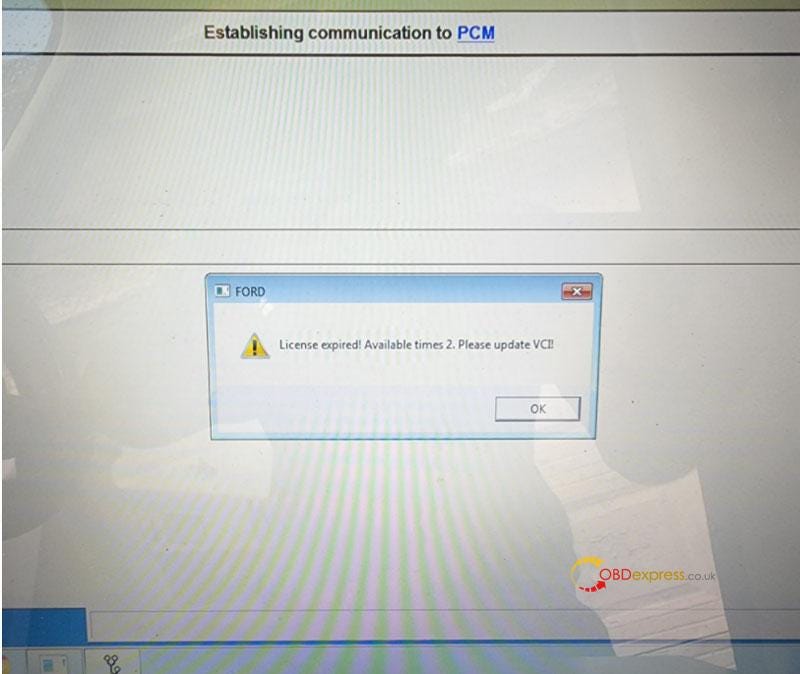
Free Download Ford VCM2 V126 to Solve License Expired Issue

  Problem: My Ford VCM2 software has popped up an attention: “License expired! Available times 2. Please update VCI!” What does this mean?...