Shipping from UK NO TAX

Showing posts with label Ford VCM II. Show all posts

Tuesday, 13 October 2020

Review:FLY SVCI j2534 ,vxdiag vcx VCM IDS ,IDS3


Today, I start a topic: FLY SVCI j2534 vs IDS3 vs. vxdiag vcx vs. VCM IDS, thanks to all users’ feedback, they used them to diagnose or program old or new Ford cars.


  1. FLY svci j2534 reviews

it’s their in-house designed and manufactured tool that’s supposed to work with bunch of manufacturer’s software, like Ford’s IDS, Mazda IDS, Toyota TIS, etc.

SVCI J2534

Image source:

https://www.obdexpress.co.uk/wholesale/fly-fvdi-j2534-mazda-diagnostic.html


1). It’s a powerful tool and works with official. latest ids software


2).I just did a PCM/TCM Module programming on a 2014 fiesta with the svci j2534 today. Honestly I was surprised how well it worked. I would suggest a USB cable. I was having issues before because my laptop USB port did not supply enough current.


3).svci j2534 work good I tested many times program keys, sync immo , remove speedlimiter etc. and work OK.


  1. Rotunda VCM with IDS software review

Let’s start with one customer’s question:

Tried programming an older eec-v pcm 2000 f150, these are j1850 and require 18v feps on pin 13. I keep getting an feps error. When prompted to turn ignition on before it starts programming I see 18v being applied for 5 seconds then 0v and then the error. I tried bench programming it as well.

I ordered another svcij 2534 to see if it was an issue with mine but I haven’t had a chance to test it. I’ll just return it now. It’s weird because it work to diagnose j1850 just fine. And it does apply 18v to program. I haven’t had a problem with CAN vehicles.


Thanks to @sazimam who recommend Rotunda VCM with IDS for the Ford pre 2002:
As for the old, pre 2002 Ford cars – you need to have a Rotunda VCM with an old IDS like version V92 and it’s appropriate offline flash files database installed in a VM since the serial number of the clone device will be 99% blacklisted. See the forum for the VM that works OK, best knowledge about this has a user “scott…” if I remember this great guy well.

Ids

  1. Fly IDS3 user bought a replacement from VXDIAG VCX Nano Ford /IDS

Just an info for FLY company. I had an IDS3 from this company and worked well for just two years. After this period it became not supported and the module programming was impossible at all, confirmed by the FLYobd stuff with a sorry and with recommendation to buy SVCI that it’s supported nowadays. Of course I quit and bought a replacement from VCX that works like a charm work the recent SW version of IDS. Having 4 VCX devices now – the oldest one for 6years already and still working well with online updates I have to support them and recommend to buy their products!

In a word, vcx it’s the best quality, three vcx nanos, working as a charm !!

Vcm 03


One more time, big thanks to all users’ test reports.


www.obdexpress.co.uk

Tuesday, 1 May 2018

My Opinions of VCM II Genuine and Good Clone

I’m pretty sure that the Chinese “engineers” who developed those clones didn’t copy the OEM board 100% . They must have took some shortcuts to save $$.
I have been looking at a couple of articles extolling the virtues of buying genuine VCM. Well they were written a few years ago and I am sure they picked the most rubbish clones then available. But the good thing is they have high res photo’s of the original Vectronix boards. Now my clone when compared has nothing missing. There is no sign of cost cutting, all parts are there. Mine is not “A” grade but likely a B grade as they did opt for the wired banana power jack rather than a PCB version which is such a minor technical issue and not worthy of people’s junk judgement.
As noted in my original post about “Gold”, the real VCM1 board has the cadmium plating at exposed test points but also has a diecast aluminium housing so I would opinion that the VCM1 was constructed to a very high standard. The original VCM2 does not seem to have the same build quality from the photos found as the VCM1. Gone is the diecast housing replaced by impact plastic as has the industrial multipin connector. Now to my opinion the new case is an improvement as shock absorption is better than a metal box. Whilst a metal box will survive a crush incident it does nothing to lesson a shock wave destroying reliability of electronic parts – of which many have ceramic as an integral part of their construction. This loss of a quality connector in favour of a sub D style connector on the VCM2 is certainly no improvement for reliability in my opinion either.
I have never seen any pictures of a VCM2 clone that has bare copper traces. The way these things are made you have to have a solder resist, usually the defacto green, so that the surface mount components can be soldered. As to the suggestion of a conformal coating being applied, I cannot see such a coating in the pictures I found of a genuine VCM2. I do agree as an engineer it should be done given the nature of a workshop environment – but there is a whole lot of things that need to be designed as part of the manufacturing process for that method before you just spray a hermatic seal on which significantly increases cost.
So there are good and bad offerings which this thread is about, where to get the good today, as the retailers chop and change their suppliers is always a mystery. Price is seldom an indication of the quality too  – I too would like to know where we can buy an excellent quality clone that is fully tested with v81 through to v104 firmware, not blacklisted and reliable. I do believe they exist and maybe the SP177-C series are good A grades – I hope so as I may order one just to test when I have some spare money…
BTW, I have just ordered a genuine VXDIAG VCX Nano Wifi to play with direct from the manufacturer off obdexpress.co.uk. I like their approach of having a generic high speed programmable interface box that is configured for the particular function i.e. IDS or GM or ODIS etc Then they deal with compatibility in the PC driver software which is written by Fly who appear to have some respect at doing this type of work. Many have commented that they have had zero problems writing to the modules using the VCX whilst others say they are crap. Only one way to tell is to get a real VCX and not a clone and see how it goes.

Src:

Monday, 16 April 2018

Ford Manager 2.4.73.37 (2.3.85.7): Tested 100% with VCM II & real cars

Yes! The new Ford Manager 2.4.73.37 is working only copy/paste the Ford Manager files over the Mazda Manger one as before.

I tired and works.
If you have a genuine/HQ cloned interface and want to use Mazda ids fully then right now it is better to stick with 2.3.85.7
mazda-ids-104-01
And yes i tested in real car also.

I did a DPF Static Reeneration in a Mazda 3 (BK) 2007
Works like a charm. All Function that I used in that car worked well
If I will see any problems I will be back to 2.3.85.7
But now I wanted to keep it as it is because I don’t wanna chane always the firmware between Ford IDS and Mazda IDS
I have a HQ Ford VCM II not a Mazda VCM II

Btw. I use ALL the Ford Manager installer. ( as it’s installed in Ford IDS partition )

http://blog.obdexpress.co.uk/2018/04/17/ford-manager-2-4-73-37-2-3-85-7/

Wednesday, 11 April 2018

How to solve VCM II - IDS software version mismatch

This is technical support from obdexpress.co.uk for “VCM II – IDS software version mismatch” and “Not Connected to VCM II”

VCM II – IDS software version mismatch (update IDS)
The software version on the VCM II is newer than the IDS software version.
Select Tick to install the latest version of the IDS software.
Select X to cancel and then roll back the VCM II to an earlier level of software.
VCM2-ids-software-version-mismatch

Software IDS 103
ford-vcm-ii-IDS-103

VCM II Manager (Ford-VCM-II): Not Connected to VCM II


Tech support from obdexpress.co.uk:

Find this button in the VCM 2 main unit, and then press on it.
VCM-II-firmware-update-1

Connect the VCM II unit to a laptop/PC with a USB cable

Note that VCM II is only connected to the PC via a USB cable, not connected to the car via an OBD cable

Press the button until the power is connected and all the lights are lighted.
VCM-II-firmware-update-2

Go to the START menu, then Bosch
Open Ford VCM II Manager, then go to VCM II Update for recovery
VCM-II-firmware-update-3

Hope it’s helpful to you.
Good luck!
http://blog.obdexpress.co.uk/2018/04/12/vcm-ii-ids-software-version-mismatch/

Tuesday, 30 January 2018

How to install Ford IDS 108 on Windows 7

VCM 2 Ford IDS v108 software Windows 7 install:

Attention please!
Please backup the important files on the Desktop and the disk C:, because the following operation will cover the content in the disk C:

If your computer hard disk only has on partition, please prepare a 16GB U flash drive
If you has 2 partitions, please unzip the software of CD intro any other partition except the disk C:

The install tutorial is used for IDS 108 software here:

If you think it hard to install IDS yourself, go for a IDS 108 within an internal hard drive. It’s the easiest way to have IDS 108. Just insert the disk into your PC, then you can use it directly.

That is, you have two options to own IDS 108.01.

Cheapest option: 24.99 EUR
http://www.obdexpress.co.uk/wholesale/Ford-ids-v108-software.html
Easiest option: IDS with an internal hard drive
http://www.obdexpress.co.uk/wholesale/ford-vcm-ids-v108.01-software.html

Both tested no issues on Ford vehicles
Diagnostic and module programming: Confirmed!
Works good with VCM2 clone units:
Item numberSP177SP177-1SP177-CSP177-C1SP177-C2
WIFI adapterNONONOYESYES
SoftwareV101V101V100V100V97
SoftwareFordFordFordFordFord
QualityOrdinaryBAA+++B
VMwareYESYESYESYESYES
UpdateYesYesYesYesYes
Pin code calculatorNONONONONO
SummarySP177-C1 is the best VCM2 - Quality A+++


Upload photos...
ford-ids-108-win7-download-install-1 ford-ids-108-win7-download-install-2 ford-ids-108-win7-download-install-3 ford-ids-108-win7-download-install-4 ford-ids-108-win7-download-install-5 ford-ids-108-win7-download-install-6 ford-ids-108-win7-download-install-7 ford-ids-108-win7-download-install-8 ford-ids-108-win7-download-install-9 ford-ids-108-win7-download-install-10 ford-ids-108-win7-download-install-11 ford-ids-108-win7-download-install-12 ford-ids-108-win7-download-install-14 ford-ids-108-win7-download-install-15 ford-ids-108-win7-download-install-16 ford-ids-108-win7-download-install-17 ford-ids-108-win7-download-install-18 ford-ids-108-win7-download-install-19 ford-ids-108-win7-download-install-20 ford-ids-108-win7-download-install-21 ford-ids-108-win7-download-install-22 ford-ids-108-win7-download-install-23 ford-ids-108-win7-download-install-24 ford-ids-108-win7-download-install-25 ford-ids-108-win7-download-install-26 ford-ids-108-win7-download-install-27 ford-ids-108-win7-download-install-28 ford-ids-108-win7-download-install-29 ford-ids-108-win7-download-install-30 ford-ids-108-win7-download-install-31 ford-ids-108-win7-download-install-32 ford-ids-108-win7-download-install-33 ford-ids-108-win7-download-install-34 ford-ids-108-win7-download-install-35 ford-ids-108-win7-download-install-36 ford-ids-108-win7-download-install-37 ford-ids-108-win7-download-install-38 ford-ids-108-win7-download-install-39 ford-ids-108-win7-download-install-40 ford-ids-108-win7-download-install-41 ford-ids-108-win7-download-install-42 ford-ids-108-win7-download-install-43

http://blog.obdexpress.co.uk/2018/01/30/how-to-install-ford-ids-108-on-windows-7/

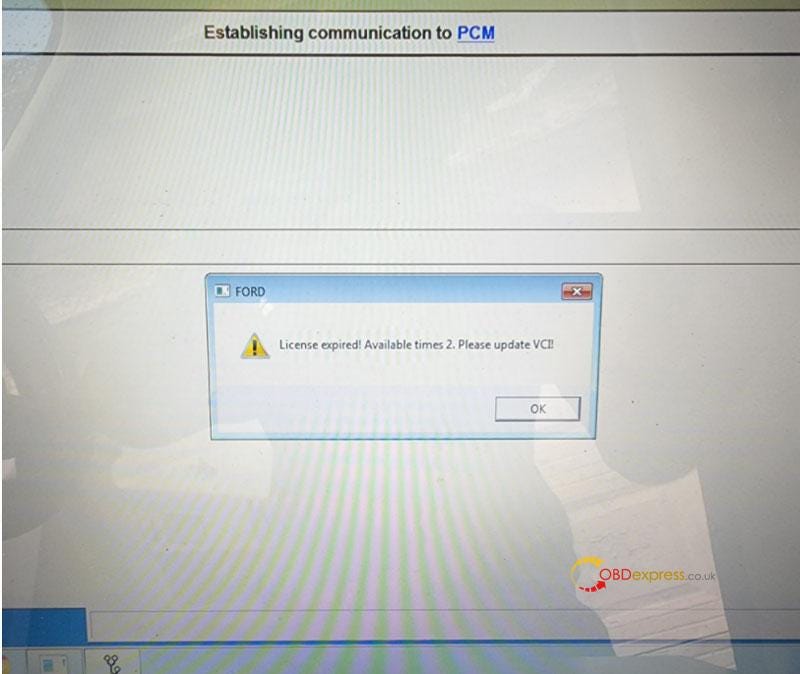
Free Download Ford VCM2 V126 to Solve License Expired Issue

  Problem: My Ford VCM2 software has popped up an attention: “License expired! Available times 2. Please update VCI!” What does this mean?...