Shipping from UK NO TAX

Showing posts with label VCM2 clone. Show all posts

Sunday, 22 April 2018

VCM2 clone and Vxdiag Vcx Nano, any difference? Which better?

I have both a vcx and a decent vcm2 clone, both from obdexpress.co.uk. I purchased the vcx first thinking I could get by with it and was sadly mistaken.

If you never intend to do anything other than read codes and live data then the vcx will do however I was never able to get it to reprogram anything or connect to ANY north american diesel trucks.

My vcm2 functions flawlessly including updating it and adding wireless to it with a pair of the proper wifi dongles.

Keep in mind when purchasing a vcm2 that there are look alike ones out there that are vcx nanos in vcm2 clothing. (I made that mistake as well lol) Buy it from someone who shows photos of the inside. the fake vcm2 will have a single pcb with one main chip and not allot else going on. A good vcm2 has a second pcb on a riser with two noticeable capacitors on it and both boards a nearly covered with components.

Look here: good VCM2 with 2 boards:

Which IDS software version for VCM2 clone SP177-C1?

If you want a VCM2 SP177-C1, IDS V100 software will come with the unit.
But if you have a VCM2 clone already and the unit is HQ clone (same as units in http://www.obdexpress.co.uk/producttags/vcm2.html ), you have luck with the latest IDS version 04-2018
The newest IDS compatible with VCM2 SP177C1 is version IDS 109:
ford-ids-109-software-download

Need install driver myself?

For vcm2 clone you can install vcm manager or ids and it will install drivers automatically.
best-ford-vcm-ii-sp177-c1

For Vxdiag Vcx Nano Ford clone in vcm2 case use vx manager which will install drivers too.
wifi-version-vxdiag-vcx-nano-for-ford

Tuesday, 9 January 2018

How to use Mazda VCM 2 and IDS software

Vcm2 model:SP177-C1

Mazda IDS installation: Success

Issues: Mazda ids can see the vcm but it won’t connect to the car.

What tried:
I tried the old trick which involves copying ford’s vcm manger files to the Mazda folder.
Mazda ids can see the vcm but it won’t connect to the car.
I tried it with latest Bosch vcm manager and ford ids 104.1 and Mazda ids 103.5
My ford and Mazda ids are not on the same partition so I simply copied the file from a partition to the other one, taking care to rename the folder to Mazda-vcm…..


Solved!!!!!!
All I did was install Ford 2.3.85.7 software and uninstalled Mazda vcm 2 software then reboot and it’s working

Ford vcm 2 patch for Mazda ids:


Thursday, 14 September 2017

New Ford module programming with VCM2 clone


VCM2 manual: NEW module programming using Ford IDS software

You need Ford IDS software, original or crack
You need a HQ VCM2 clone SP177-C or SP177-C1
(VCM2 genuine definitely is the best solution, but a high-quality one should work great, not  cheap crappy tools)

When installing a new module, the configuration data must be transferred from the old module beforeit is removed. The new module will then be programmed using this information. Use the followingsteps to download the data from the existing module and program the new module:

Step 1: Select the toolbox tab at the top of the screen
Step 2: Select "Module Programming"
Step 3: Select the tick mark or the Enter key
Step 4: Select "Programmable Module Installation"
Step 5: From the fly out menu, select the type of module to be installed
Step 6: Select the tick mark or the Enter key
Step 7: Make sure that an Internet connection has been established and then select "Confirm"
Step 8: Follow the instructions on the screen. These instructions vary depending on the type ofmodule being installed.

NOTE: Be sure to follow these instructions in the exact order that they are given. Do not remove or install any modules until instructed to do so. Failure to follow the instructions correctly may result in the configuration data received during vehicle identification to program incorrectly or not at all.

Step 8A: If Ford Module Programming was unable to retrieve the configuration data due to either
a non-functioning module or a module which was removed before the data was retrieved, the
application will request that the user obtain information from the Module Build Data (As Built)
database. Access to this database is included in the Ford Module Programming subscription. The
data can be obtained by doing the following:
  • Go to the Motorcraft website (www.motorcraft.com)
  • Go to the Technical Resources area
  • Log in using the User ID and password set up when the subscription to Ford Module
Programming was purchased
  • Select "My Subscriptions"
  • Select "Ford Module Programming"
  • Select "Module Build Data (as Built)"
  • Enter the Vehicle Identification Number (VIN) and select "Submit"
  • Write down the information that was requested by the Ford Module Programming
application
  • Return to the Ford Module Programming application and enter the requested information
Step 9: If necessary, apply the reprogramming label to the PCM
If an emissions recall has been performed or a required emissions-related TSB has been completed,
an Authorized Modification label must be placed on the PCM. These labels can be purchased at the
parts counter of a Ford or Lincoln/Mercury dealership.

NOTE: It is the responsibility of the technician to inform the customer that Ford Motor Company will not reimburse the vehicle owner for field service actions that are not completed at a Ford or Lincoln/Mercury dealership.

Step 10: When the "Programming complete" screen appears, select the tick mark or the Enterkey. If PATS initialization is required, Ford Module Programming may automatically link to the PATSparameter reset and/or key relearn procedures. Two ignition keys may be required to complete the
PATS initialization procedure.
Step 10A: If PATS initialization is required and Ford Module Programming did not link to thatfunctionality automatically, go to the Toolbox tab and select "PATS". Detailed instructionsare provided in Section 6.

Good tips you may need:

Where to buy VCM2 clone of high quality?

Where to buy VCM2 clone at the best price?

Ford IDS crack download: (TRY ON YOUR OWN RISK)
IDS 104:

How to reprogram Ford PCM with vcm2 clone:


Wednesday, 13 September 2017

How to use VCM2 clone for Ford module reprogramming

VCM2 manual: Ford IDS reprogram PCM/ECM modules.

What is a reprogram engine control module?
The Engine Control Module (also called the Powertrain Control Module or PCM) is the brains of the engine management system. It controls the fuel mixture, ignition timing, variable cam timing and emissions control

What is the PCM on a Ford?
A power-train control module, abbreviated PCM, is an automotive component, a control unit, used on motor vehicles. It is generally a combined control unit, consisting of the engine control unit (ECU) and the transmission control unit (TCU).

What is flashing a ECM?
ECM ECU PCM TCM FLASH – ENGINE COMPUTER VIN PROGRAMMING FLASH & REFLASH. “Flashing” refers to reprogramming automotive engine control modules (ECMs). Almost all new vehicles today are now flash programmable. Flash reprogramming is an important part of repairs and tune-ups on most 1996 and newer cars.

What is PCM reprogramming?
To reprogram a PCM or other vehicle module, you need a factory scan tool, or an aftermarket scan tool with reprogramming capabilities, or a J-2534 compliant “PassThru” interface tool (or J-2534-1 for 2004 & newer vehicles) that can connect a PC or scan tool to the vehicle’s diagnostic connector or module.

How to do Ford module reprogramming?

When a module such as a PCM is reprogrammed, it is not removed from the vehicle. All programmingis done through the communications network.

You need Ford IDS software, original or crack
You need a HQ VCM2 clone SP177-C or SP177-C1
(VCM2 genuine definitely is the best solution, but a high-quality one should work great, not  cheap crappy tools)

Good tips you may need:

Where to buy VCM2 clone of high quality?

Where to buy VCM2 clone at the best price?

Ford IDS crack download: (TRY ON YOUR OWN RISK)
IDS 104:

To reprogram an existing module, follow these steps:

(please connect the cloned VCM2 unit to the car and run Ford IDS)

Step 1:Select the toolbox tab at the top of the screen
Step 2: Select “Module Programming”
Step 3: Select the tick mark or the Enter key
Step 4: Select “Module Reprogramming”
Step 5: From the fly out menu, select the type of module to be reprogrammed
Step 6: Select the tick mark or the Enter key
Step 7: The application will compare the current calibration level to the latest one available for thatvehicle. A message will appear.
Step 7A: If no later calibration is available, a message will appear indicating this. Select the tickmark or the Enter key to return to the Module Programming menu.
Step 7B: If a later calibration is available, a message will appear asking if you want to reprogramthe module with this calibration. If you do not want to reprogram the module, select “No”. You willbe returned to the Module Programming menu.
Step 8: If you want to reprogram the module, select “Yes” in response to the question “Do you wantto program the vehicle with this calibration?”
Step 9: Make sure that an Internet connection has been established and then select”Confirm”
Step 10: You will be presented with a screen that recommends that you carry out Self Test. If youchoose to complete this test, you will receive a list of Diagnostic Trouble Codes (DTC’s) that havebeen set on the vehicle. When finished viewing this list, select “Exit”.
Step 11: Follow the on-screen instructions to prepare the vehicle and turn the ignition key off and on.
Select the tick mark or the Enter key after each one.
Step 12: If necessary, apply the reprogramming label to the PCM
If an emissions recall has been performed or a required emissions-related TSB has been completed,an Authorized Modification label must be placed on the PCM. These labels can be purchased at theparts counter of a Ford or Lincoln/Mercury dealership.
Step 13: Select the tick mark or the Enter key to return to the Module Programming menu.


a very important note:
Ford VCM2 IDS Error Code:11.0×0 851082 when PCM reprogramming

It’s aimed to help how to reprogram/reflash Ford PCM via IDS software esp. for those with  Error Code:11.0×0 851082 will be shared here by other users.

Error message:
“The operation cannot begin because the PCM failed to complete a service procedure. Perform PMI on the PCM to resolve the issue.”

Possible scanners working with:

Customer solutions:
Customer A:
Turnoff your firewall

Customer B:
Uninstall fmp and reinstall it. I have had this happen before.
I have had some new pcm be un programmable.
And just for reference. Fmp doesn’t like Google. Use 32 bit processor as well.
I had to slow my computer down from 64-32 because fmp would not work correctly with 64.
Good luck.

Customer C:
If you are checking PCM for up-dates, Ford will advise on 6.0L powertrain if there is a reflash avail for TCM, FICM or PCM, if it states there is no update then all three modules are at latest level, no action required, I am aware it states to remove FICM relay prior to reflash FICM, this is a carryover note from when we used PDS or WDS to reflash the FICM, if you are using IDS with VMM interface its not required to remove the FICM relay, I have reflashed over 1000 of them this way over the last 7 years, as always make sure the battery stays in the sweet spot @ 13.5 volts, make sure your laptop has sufficient power, I always plug in, make sure cables to veh and laptop are safe from accidental disconnect, Good luck!

Customer D:
If you try to VCM2 genuine or clone to make reprogaming well you need IDS V98.01 or higher.
It would be good to check if during initiation programming interface output 18,5V on pin 13 in OBD connector.

Thursday, 31 August 2017

How to use VCM II solve Ford truckF250 error “PCM is unrecognized”

Happy to share something of my VCM2 clone with my Ford super duty F250 6.7 diesel 2011.

When i connect the VCM up to my truck i get this error message:
The unique PCM identifier is unrecognized
Verify that the latest CD has been loaded onto the diagnostic tester.
Where supported, update the diagnostic tester with the lasted calibration files from
Non-North American Ford and Mazda technicians should contact their local hotline.

My model: super duty truck 6.7 diesel, the2011 year model

What i tried
start new session, dont select anything— FAILED

Use a never version of ids— FAILED
im using hanson2000’s vmware IDS 101.04 or 05


SOLVED!!!!!!!!!!!!!
it’s a clone issue some are blacklisted especially on the never v. Of ids.
It worked!!!IDS v86.01 in vmware with c81 calibration. It let me connect to my 6.7 diesel 2011 super duty!! I was able to turn on regen and reset my tire and axle ratio!!!

Thanks thanks thanks!! To all in the MH community!

Monday, 21 August 2017

VCM2 WiFi Where to buy at the best price?

VCM2 clone SP177-C1 best price: 159 euro (08/22/2017-08/31/2017)
the price back to 205 euro after 10 days
VCM2 Wifi SP177-C1 is the best quality China clone
Cloned VCM2 SP177C1 from others: most are more expensive than VCM2 clone in obdexpress.co.uk
VCM2-clone-SP177C1-cardiagtool VCM2-clone-SP177C1-cardiagtool VCM2-clone-SP177C1-obd2france
VCM2 SP177C1 best price from us: 159 euro
(cheaper price only because this item is listed for promotion, not quality issues)
VCM2-clone-SP177C1-obdexpress

DO NOT SAY YOU CAN BUY A VCM2 clone AT A BETTER PRICE
QUALITY TALKS. You will get what you pay for.


- What else you should read before your purchase:
VCM2 clone reviews:
VCM2 SP177C or SP177C1 reviews:

VCM2 clone reviews:
VCM2 SP177C or SP177C1 reviews:

Src:
http://blog.obdexpress.co.uk/2017/08/22/vcm2-clone-where-to-buy-at-the-best-price/

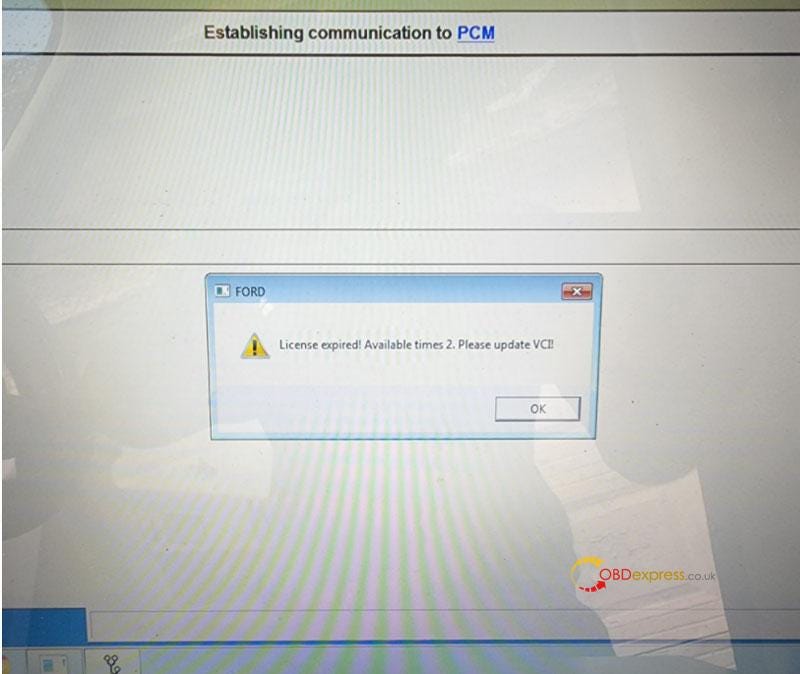
Free Download Ford VCM2 V126 to Solve License Expired Issue

  Problem: My Ford VCM2 software has popped up an attention: “License expired! Available times 2. Please update VCI!” What does this mean?...