Shipping from UK NO TAX

Showing posts with label Ford VCM II Software. Show all posts

Wednesday, 5 August 2020

How to solve laptop wont connect to VCM2 V86?

Question: I’ve got a VCM 2 that’s using the v86 program that’s about 4 years old.
Took me a while to get it working but has worked ever since on a couple of Van’s and 2 of my fiestas now the laptop won’t connect to the VCM even though it makes the bong bong sound when I plug something into the USB port.
The lights on the VCM are a little random.
The laptop light will light when it’s only plugged into the van and the standby light is the only one that lights when the laptop is plugged in.
Tried a different USB laptop to VCMII and it’s still the same.
If I get a new one will it just plug into laptop and work or will I need to set it up?
Also what at the Forscan things people use, would one of them be better for resetting the learned values on an mk7 euro5?

laptop wont connect to VCM2 V86 solution 1

laptop wont connect to VCM2 V86 solution 2

Solution:

  1. Try resetting the vcm by pushing the tab beneath the end cap, the springy part above the USB slot in the pic, and then updating the drivers again.
laptop wont connect to VCM2 V86 solution 2


  1. If you have Forscan downloaded on your laptop you can try using the vcm as the interface for Forscan if your vcm is bricked and I hope it’s not it works better than the elm as it will automatically switch between high/low can.


ford vcm2 is also j2534 pass-thru interface,vcm1 is not, and VCM module is for measurements using ford ids, and this forscan software runs j2534 protocol devices as per j2534 vcm2.


FORScan can only work with VCM using the J2534 Passthru interface. VCM 1 doesn’t support J2534 Passthru so can be used with IDS only. VCM 2 and VCMM (next model after VCM2) work fine with FORScan.


  1. Answer to the question” If I get a new one VCMII will it just plug into laptop and work or will I need to set it up?”

– After you plug the new VCMII to the computer, open the device manager, if you can’t see the update button, please directly use the IDS. If you can see the update button, just click on it to update before using IDS.


Here obdexpress.co.uk chief engineer recommends you one best VCMII clone:

https://www.obdexpress.co.uk/wholesale/best-quality-ford-vcm-ii-oem-diagnostic-tool-ids-wireless.html

Monday, 16 December 2019

Free download IDS Ford Mazda V116: VCM II & VXDIAG Nano OK

Newest version IDS Ford Mazda V116 Scan tool Diagnostics & Vehicle Reprogramming for
Ford, Lincoln, Mercury, Mazda vehicles.

Integrated Diagnostic Software (IDS) - The factory Ford Motor Company vehicle diagnostic software provides complete dealership level vehicle diagnostic coverage for all 1996 to present Ford, Lincoln and Mercury vehicles. IDS is a flexible diagnostic tool that utilizes standard computing platforms to work with Original & Clone VCM, VCM II, VCMM, VXDIAG VCX Nano interfaces.
This version can also download latest calibration files from ford server if there exist an internet connection at the moment you connect to the vehicle.
IDS V116
Ids Ford Mazda V116 02

Ford Mazda IDS V116 for VXDIAG VCX Nano:
http://www.obdexpress.co.uk/wholesale/wifi-version-vxdiag-vcx-nano-for-ford-mazda-ids.html
Mega link is not available yet.

Ford_Mzd_Patch:
https://mega.nz/#F!AooiHQrR!WsDPAmflZTrFsaKmLT7G8w

FordExtendProgr .exe
https://mega.nz/#!gREkDChZ!7Yo8_ks39I0Wr6-k8nspZauR6qMqvdfcqeHlR60GMxc

Car brand: Ford, Lincoln and Mustang
Software name: Ford IDS / FordScan ( support programming, coding, programming key)
Car model year: 2005 - 2019

Car brand: Mazda
Software name: Mazda IDS/ForScan (support programming, coding, programming key)
Car model year: 2005 - 2019

Program Features:
  1. Multi-Language: English, German, French, Italian, Spanish, Netherlands, Swedish, Danish, Norwegian, Portuguese, Slovak
  2. Reading and decoding fault codes
  3. Download the very latest calibration files from Ford server
  4. Deleting fault codes
  5. Displays system current parameters in digital form
  6. Combined displaying of data
  7. Logs keeping - writing and keeping of digital parameters in memory
  8. Support Online programming, but you must have online account, we do not provide this account.
  9. Special functions - changing of permissible settings of blocks, programming etc.
Ids Ford Mazda V116 03

System requirements:
OS: XP, VISTA, Windows 7 32 & 64 bit (Recommend Windows 7 64bit), Windows 8, 10
CPU: 1.8 GHz or greater (Dual Core Or Higher)
RAM: 2GB
HARD DRIVE: 10GB Free Disc Space Minimum
INTERFACES: Original & Clone VCM, VCM II, VCMM, VXDIAG VCX Nano

What you receive:
  1. IDS 116.02 (Software)
    2. IDS Activator (Patcher)
    3. vxdiag manager

V116 Ford VCM VCM2 IDS Full Software
http://www.obdexpress.co.uk/wholesale/ford-vcm-ids-v108.01-software.html

Enjoy
Source:http://blog.obdexpress.co.uk/2019/12/17/ids-ford-mazda-v116-update-download/

Thursday, 19 April 2018

How to step by step install Ford IDS 109 software

How to install Ford IDS 109 software:
1- Install the ids 86 before changing the date to 1 07 2015
(hold the date 1/7/2015 ,, until you finish step 5
every time you restart your computer, check the date, if it is  on 1/7/2015)
2- install patch ( choice option 2 )
3- Make a backup of your windows system (I recommend, this is optional)
4- Open the program with the interface connected ,,( choose NON DEALER,when open program for first time ) , keep vcm turn on,on the computer.
5 - create a restore point,,,then turn off vcm of the computer
6 - Okay, now install the new version,  v109.01, before installing, changing the date of your computer, to the current day
7- After installing, go back to the restore point, which you created in step 5, activate this restore point, and then open the program
8- Finally, install FordExtendProgram  (click right mouse button click on, run as administrator)

Done, will work in the new version

Note, here’s solution of VCM II IDS software update error
Error message in update IDS 109:
Error message in update IDS 109


VCM II - IDS software version mismatch (update IDS)
The software version on the VCM II is newer than the IDS software version.
Select Tick to install the latest version of the IDS software.
Select X to cancel and then roll back the VCM II to an earlier level of software.
vcm-ii-software-ids-109-update-error-message

se ha producido un problema al actualizar el software vcm ii
es nece sario realizar un restablecimiento de fabrica de vcm ii
pulse el icono de confirmacion para realizar el restablcimiento
pulse x para cancelar

There was a problem updating the vcm ii software
It is necessary to carry out a factory restoration of vcm ii
press the confirmation icon to perform the reset
press x to cancel

How-to’s:
Update VCM II firmware, using the tutorial: http://blog.obdexpress.co.uk/2018/04/12/vcm-ii-ids-software-version-mismatch/

Edit to add a note:
Ford IDS 109 Tech Support - Remote Installation
http://www.obdexpress.co.uk/wholesale/ford-vcm-ids-v108.01-software.html

Src:http://blog.obdexpress.co.uk/2018/04/20/how-to-install-ford-ids-109-software-for-vcm-ii/

Thursday, 11 January 2018

(Solved) VCM2 firmware is newer than IDS software

Recently,OBDexpress has received some question about Ford VCM2 firmware downgrade,and obdexpress found the same problem in the mhhauto OBDII scan forum.

Here you are:

I just get VCM2 and instaled IDS v86 and when I start sw error I get that VCM firmware is newer then IDS sw.
How to do?
Customer solutions from the MH forum:

Press and hold reset button after that insert usb to pc still hold reset button when you will hear beep after that release reset button.

If it does not works….

Try to use this Ford VCM II Software setup v2.1.119.3. I have Chinese clone Ford VCM II and working with Ford IDS v86, Mazda IDS v91 and with JLR SDD v138 with this software setup too. My VCM have no problem with update downgrade I had installed Ford IDS v95 after that v86 and no problem update downgrade. When I installed JLR SDD v138 I had to update VCM to this version and after that was not functional with Ford IDS v86 after installing this setup was all functional.

Ford VCM II v2.1.119.3:
(RUN v2.1.119.3 on a computer without any IDS or SDD
Start VCI Manager and press update /start
you can do this without press the button on vcmii)

When I want update or downgrade VCM I have to only connect VCM with PC not need connect VCM to OBD. I have installed this softwares on VMware each separately. Each with new clean windows xp. I have not installed newest Ford IDS v95 for example because I don`t know how to freeze system still after 5 days license k.o.  But I had installed this new version Ford v95 and worked this new software update without problem. I install V94 and after that IDS said me is new version v95 I downloaded it and it worked.


I am using V94, and I was told I need OSCH VCI MAMAGER2.1.119.3, NOT 2.1.19.19

TizWazsaid, “IF YOU ARE USING VERSION 94, YOU WILL HAVE WRONG VERSION BOSCH VCI MAMAGER , IT WILL BE 2.1.19.19
YOU NEED 2.1.119.3
you need to press the reset button on the vcmII WHILE CONNECTED TO 12V, then when you see all lights flash at once on the vcmii, you put to usb , wait for beep release reset button on VCMII and start VCI MANAGER.
BUTTONS IN VCI MAAGER SHOULD COME ALIVE BUT YOU NEED TO DO IT WITH VERSION 2.1.119.3
SO IN ids 94, you can go to program and features and uninstall version 2.1.119.19 , reboot and install 2.1.119.3
to install MAZDA IDS With ford VCMII”

I downgrade my vcm2 firmware to work with Ford IDS v86, and now ford is ok for me.
I followed a youtube video and I installed (on free IDS PC) Mazda IDS v88 (because I readed that v88 will work with same firmware as ford v86) . Changed Bosch VCI manager files from ford into mazda and now when start vcm manager ask me to update to newer version , but I not wanna update and skip that.
When start Mazda IDS also told me that must update, so which version of mazda will work with same ford v86 fw? Must I search for Mazda v86??

Note: the version software is unimportant , its the ETAS version that matters .
2.1.119.3
you use the SAME one across all JLR, MAZDA, FORD.
IF ORIGINAL VCMII YOU CAN USE 2.1.119.19

If clone Ford VCMII, USEthat etas version for your FORD, MAZDA, and JLR


Enjoy and good luck!

(BIG THANKS to laco210 and TizWaz)

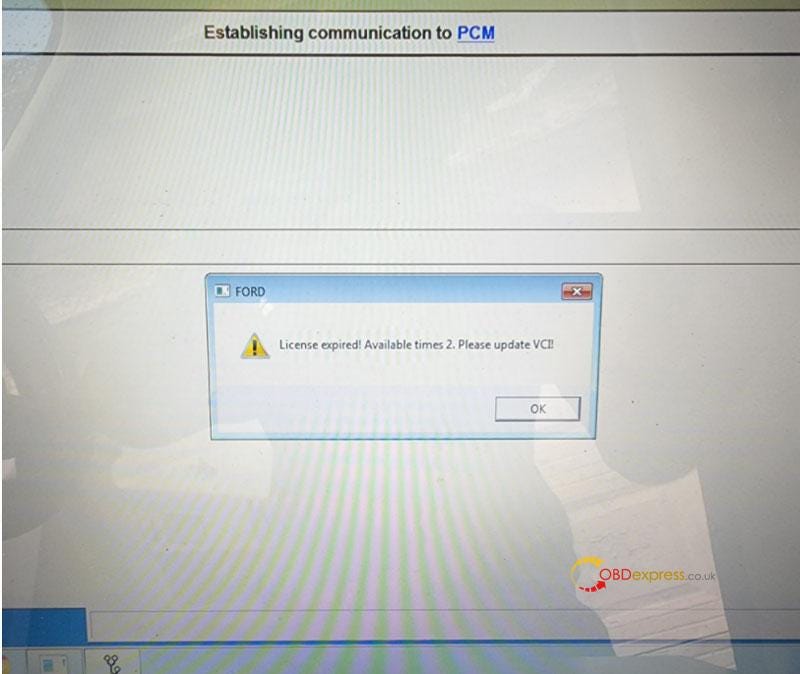
Free Download Ford VCM2 V126 to Solve License Expired Issue

  Problem: My Ford VCM2 software has popped up an attention: “License expired! Available times 2. Please update VCI!” What does this mean?...