Shipping from UK NO TAX

Showing posts with label ford ids software. Show all posts

Sunday, 21 July 2019

How to install+activate Ford IDS 114.03 for VCM II

Ford IDS 114.03 is newly released with new more fix:
1). online programming...Confirmed
2). included calibration file...confirmed.
3). included incode calculator for old model key programming or module installation new series need a dealer account.
ids-114-03-01
ids-114-03-02

Ford IDS 114.03 is tested ok with VCM, VCM2 (original or clone) etc.
vcm2
VCM 2 SP177-C:
http://www.obdexpress.co.uk/wholesale/ford-vcm-ii-diagnostic-tool-wifi-card.html
VCM 2 SP177-C1:
http://www.obdexpress.co.uk/wholesale/best-ford-vcm-ii-diagnostic-tool-wifi-wireless-version.html
VCM 2 SP177:
http://www.obdexpress.co.uk/wholesale/best-quality-ford-vcm-ii-oem-diagnostic-tool-ids-wireless.html
VXDIAG NANO Ford : is testing

IDS 114.03 installation and activation via teamviewer only (Offline).
Ford IDS 114.03 features in Native remote installation, that means you can use it unlimited time, instead of installing on vmware or other virtual software.

Service for IDS 114.03 remote native installation
http://www.obdexpress.co.uk/wholesale/ford-vcm-ids-v108.01-software.html
Remember install teamviewer in advance before contacting.

Ford IDS 114.03 capabilities:
* Automatic vehicle recognition
* Read & Clear Diagnostic Trouble Codes (DTCs)
* Live Data-stream with Recording & Playback Functions for Main ECUs
* Guided Fault Finding
* New Software Re-flash for Existing ECUs
* Programming & Installation of new ECUs (PCM, ABS, Instrument Cluster, Air Bag, Fuel Pumps, etc.)
* Program New Keys (for additional fee)
* Injector Coding
* Set, Adjust or Remove Speed Governors
* DPF Regeneration
* Brake Bleeding
* Steering Angle Resets
* All Other Offline and online Dealer Functions

Thanks.
 Source:
http://blog.obdexpress.co.uk/2019/07/22/ford-ids-v114-03-download/

Wednesday, 11 April 2018

How to solve VCM II - IDS software version mismatch

This is technical support from obdexpress.co.uk for “VCM II – IDS software version mismatch” and “Not Connected to VCM II”

VCM II – IDS software version mismatch (update IDS)
The software version on the VCM II is newer than the IDS software version.
Select Tick to install the latest version of the IDS software.
Select X to cancel and then roll back the VCM II to an earlier level of software.
VCM2-ids-software-version-mismatch

Software IDS 103
ford-vcm-ii-IDS-103

VCM II Manager (Ford-VCM-II): Not Connected to VCM II


Tech support from obdexpress.co.uk:

Find this button in the VCM 2 main unit, and then press on it.
VCM-II-firmware-update-1

Connect the VCM II unit to a laptop/PC with a USB cable

Note that VCM II is only connected to the PC via a USB cable, not connected to the car via an OBD cable

Press the button until the power is connected and all the lights are lighted.
VCM-II-firmware-update-2

Go to the START menu, then Bosch
Open Ford VCM II Manager, then go to VCM II Update for recovery
VCM-II-firmware-update-3

Hope it’s helpful to you.
Good luck!
http://blog.obdexpress.co.uk/2018/04/12/vcm-ii-ids-software-version-mismatch/

Sunday, 1 April 2018

(Solved) VCM2 WiFi only work with v86, not newer IDS

Thread about VCM2 WiFi on newer IDS software
I think its pretty clear why it doesn’t work now from watching the serial connection to the VCM’s output….The drivers aren’t loading on the VCM. That was what I was pointing out.


My wifi works only with v86 not with any other versions but haven’t worked out which file to swap

He alluded to the key being getting the v86 VCI to work with the newer VCM firmware in another post. I was able to beg v86 VCI to talk to v101.04 VCM firmware without saying it needed to upgrade the other day but not to my benefit :/
I am currently getting a laptop deployed that has more than one USB 2.0 port. I tried using 3.0 by setting the vmplayer to USB3 mode adding adding the driver on the guest OS for the USB 3 host controller which all went fine but the Host OS isn’t passing devices through to the vmplayer guest OS that I plug in to USB3 ports :/
I never thought having a newer model laptop would hurt me
And…… Physical hardware with v86 installed directly on it worked just fine for WiFi! Gonna grab the individual VCM’s config file from the VCI manager and see if that works in 101.04 The file is generated when you first plug in the VCM to software for the first time.

Another note you’d better read:
it wont work , if it is detected that you are trying to use an older version VCI Manger , the setup installs the vci manager from another location , might work upto about 97 version , but deffo not in 100 or 101 version, to get and older vci manager to work in 100 plus version requires quite a lot of work to be fair .
swapping individual files wont work either, thats why the firmware patch only worked to 97 version, after that the vci manager changed the install location of the firmware files and stuff, look at your two different setup’s 86 – 101 to see what i mean.

Advice form experts:
Better use genuine VCM2 or HQ cloned VCM2 SP177-C1, no issues of WiFi & IDS compatibility.
Easy to find out a genuine Ford VCM2 unit via Google;
But attention please when you wanna go to a VCM2 clone -READ IT:
Where to buy Ford VCM2 clone SP177C or SP177C1


Src:

Monday, 12 March 2018

How to get GM MDI clone to work with Ford IDS?

Does anyone know if my clone GM MDI interface will work with Ford IDS software without limitations?
Also is there anyway to convert my MDI to a VCM II by flashing it? They seem to be very similar.

Possible but not easy…Requires editing of the Dynamic link libary files and more.

i have had MDI Working with it for a long time for personal use
Since version 97.xxx it is easier than say 96.01 becuase when they changed things to block clones in this version, they basically changed the file stucture to that of an MDI.
but whats the point with tools like vxdiag vcx nano flying about for around the £50.00 mark using the same process as i talk about ….they are good working tools for little money that can be thrown away when blocked or damaged and repurchased…..you would need to buy a lot of these buy the time you bought an original VCMII
let me give you an example…with licensed ford ids and clone VCM-II , You are still blocked from server….with genuine VCM-II and good keygened software thing still work 100%…YOU CAN CHECK THIS NOT IN IDS But in ETIS.
the main thing dealer sites look for is genuine hardware but sometimes genuine serial in clone tool is not enough, example JLR SDD
after many years of messing about with this sort of stuff i can honestly say the way to go is…Genuine tools with Genuine software, which is out of most people like you and me’s reach so 2nd to that is genuine tools with GOOD modified software that works in the real world….Some clones work well and are reliable like Vas5054a, Lexia interface...renault can clip.icom a2‘s….sdconnect….interface of good quality…..but when i spend a lot of money on tools i want them to work , software i can always sort myself so i try to buy genuine hw for personal use , way less problems this way…..long winded post i know but i thought i would share my thoughts in general …..Kind Regards


Credits to the contributor from https://cartechnology.co.uk/

http://blog.obdexpress.co.uk/2018/03/13/gm-mdi-clone-works-with-ford-ids/

Thursday, 14 September 2017

New Ford module programming with VCM2 clone


VCM2 manual: NEW module programming using Ford IDS software

You need Ford IDS software, original or crack
You need a HQ VCM2 clone SP177-C or SP177-C1
(VCM2 genuine definitely is the best solution, but a high-quality one should work great, not  cheap crappy tools)

When installing a new module, the configuration data must be transferred from the old module beforeit is removed. The new module will then be programmed using this information. Use the followingsteps to download the data from the existing module and program the new module:

Step 1: Select the toolbox tab at the top of the screen
Step 2: Select "Module Programming"
Step 3: Select the tick mark or the Enter key
Step 4: Select "Programmable Module Installation"
Step 5: From the fly out menu, select the type of module to be installed
Step 6: Select the tick mark or the Enter key
Step 7: Make sure that an Internet connection has been established and then select "Confirm"
Step 8: Follow the instructions on the screen. These instructions vary depending on the type ofmodule being installed.

NOTE: Be sure to follow these instructions in the exact order that they are given. Do not remove or install any modules until instructed to do so. Failure to follow the instructions correctly may result in the configuration data received during vehicle identification to program incorrectly or not at all.

Step 8A: If Ford Module Programming was unable to retrieve the configuration data due to either
a non-functioning module or a module which was removed before the data was retrieved, the
application will request that the user obtain information from the Module Build Data (As Built)
database. Access to this database is included in the Ford Module Programming subscription. The
data can be obtained by doing the following:
  • Go to the Motorcraft website (www.motorcraft.com)
  • Go to the Technical Resources area
  • Log in using the User ID and password set up when the subscription to Ford Module
Programming was purchased
  • Select "My Subscriptions"
  • Select "Ford Module Programming"
  • Select "Module Build Data (as Built)"
  • Enter the Vehicle Identification Number (VIN) and select "Submit"
  • Write down the information that was requested by the Ford Module Programming
application
  • Return to the Ford Module Programming application and enter the requested information
Step 9: If necessary, apply the reprogramming label to the PCM
If an emissions recall has been performed or a required emissions-related TSB has been completed,
an Authorized Modification label must be placed on the PCM. These labels can be purchased at the
parts counter of a Ford or Lincoln/Mercury dealership.

NOTE: It is the responsibility of the technician to inform the customer that Ford Motor Company will not reimburse the vehicle owner for field service actions that are not completed at a Ford or Lincoln/Mercury dealership.

Step 10: When the "Programming complete" screen appears, select the tick mark or the Enterkey. If PATS initialization is required, Ford Module Programming may automatically link to the PATSparameter reset and/or key relearn procedures. Two ignition keys may be required to complete the
PATS initialization procedure.
Step 10A: If PATS initialization is required and Ford Module Programming did not link to thatfunctionality automatically, go to the Toolbox tab and select "PATS". Detailed instructionsare provided in Section 6.

Good tips you may need:

Where to buy VCM2 clone of high quality?

Where to buy VCM2 clone at the best price?

Ford IDS crack download: (TRY ON YOUR OWN RISK)
IDS 104:

How to reprogram Ford PCM with vcm2 clone:


Sunday, 6 August 2017

How to program PCM with As-Built data with Ford IDS software

To program the PCM with As-built information via Ford IDS software:

Enter the Module Programming menu in the IDS
Select As-built and then the PCM
If the PCM is not listed in the As-built tab, use the following process to manually enter the information.
Select the IDS logo in the upper left corner of the screen.
Select the Pocket knife in the lower left corner of the screen.
Select “Update/Special Functions” from the Miscellaneous menu.
 Ford IDS software update function

Enter 53061 into the blue box and click the tick.
Return to the Module Programming menu and select PMI then the PCM.
Follow the on-screen prompts and enter the As-built data when the IDS prompts for it. This data is available from the OASIS report for this VIN under the As-built tab. It has also been provided below for your convenience.
Complete the PMI process by continuing with the on-screen directions.
To get As Built Data, go to Motorcraftservice.com
Under Non-Subscription Resources, click on Quick Guides.
13 dot points down you will fine, “Module Build Data (As-Built)”
Enter “Module Build Data”
Enter the VIN# then submit. As Built Data will then be displayed in IDS interface.


Some codes/info listed here as an example:

Use at your own risk!

00008 – IDENT_APPLY_PATCHES_VIA_FLOPPY
00009 – IDENT_UPDATE_PTU_FROM_FLOPPY
32287 – IDENT_LAUNCH_APP_MCP_REST
60503 – IDENT_LAUNCH_REGRESSION_RECORDER
27001 – IDENT_LAUNCH_FT_EOL_CP_MZ_01
32247 – IDENT_LAUNCH_SERVICE_ROUT
24040 – IDENT_ENABLE_VALIDATION_MODE
24041 – IDENT_DISABLE_VALIDATION_MODE
23761 – IDENT_LAUNCH_APP_FT_DATA_REC
81105 – IDENT_LAUNCH_APP_TSBSSMLIST
53061 – IDENT_IGNORE_MCP_INHALE
26503 – IDENT_LAUNCH_APP_VVAG
81104 – IDENT_LAUNCH_APP_FTW_SHIP_MODE_01
29124 – IDENT_TOGGLE_FORD_EXTRANET_INTRANET_URLS
60274 – IDENT_LAUNCH_CCC_ENGINEERING_APP
32227 – IDENT_LAUNCH_PROPSHAFT_BAL_APP
48712 – IDENT_LAUNCH_GENERIC_RCM_CONFIG_APP
28487 – IDENT_LAUNCH_FT_ICCMSP_MZ_01_APP
28097 – IDENT_TOGGLE_BATTERY_MONITORING
70263 – IDENT_LAUNCH_GENERIC_DIAG
71863 – IDENT_MCP1
63296 – IDENT_LAUNCH_FTW_RKE_MODE_01_APP
08080 – IDENT_LAUNCH_DETAILED_NETWORK_DIAG
32267 – IDENT_LAUNCH_APP_ENG_SUPPORT_TOOL


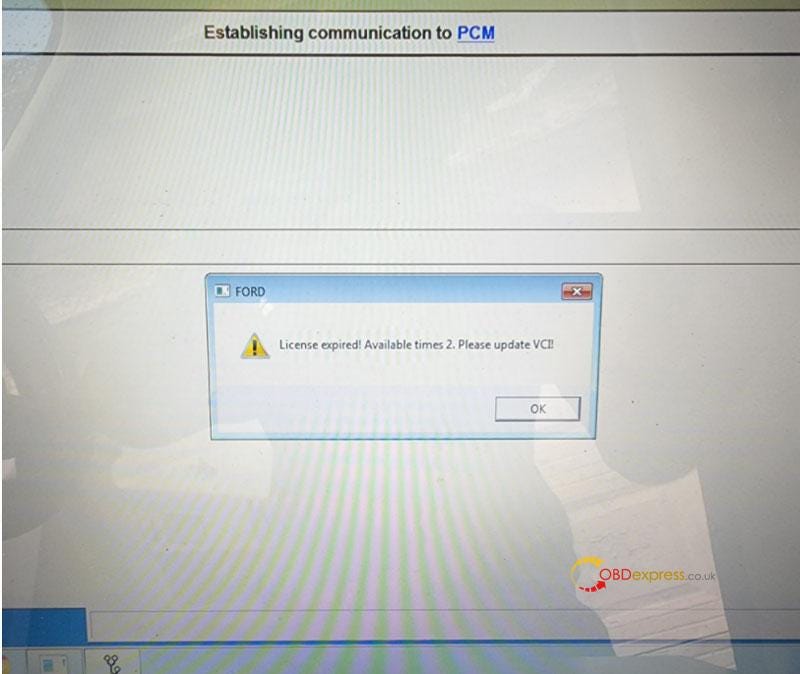
Free Download Ford VCM2 V126 to Solve License Expired Issue

  Problem: My Ford VCM2 software has popped up an attention: “License expired! Available times 2. Please update VCI!” What does this mean?...