Shipping from UK NO TAX

Tuesday, 30 October 2018

(Fixed)missing xml files - VCM2 IDS cannot complete PCM flash

If your VCM2 IDS cannot flash PCM coz xml files are missing,How to do? Here is someone's solution for you,enjoy!
Problem:
I had a 2013 Ford fiesta TDCi .
I tried to do PMI ..
There is later update available for this PCM online .
I could not complete the pcm reflash as it was looking for two missing xml files on it ..
Is your IDS also a mix off old soft with later soft to keeep the licence for three days .
On previous vehicles i tried i never had problems on updating the PCM to latest calibration files..

Remedy:
I also have this problem, somehow all files in this folder got zero size. So every time it happened I copying them from another location and after programming works fine. I did a lot of cars and trucks with this setup

In detail..

path approximately program files/ford/ids if you have a problem do the search on the file name.
Install any new IDS version from motorcraft.com or any reliable source (I have mine from http://www.obdexpress.co.uk/wholesale/ford-vcm-ids-v108.01-software.html)
and copy them to host desktop.
After, in VM setting do share folders and you can get those files from VM

Searches related to PCM flash with VCM2:

How to preprogram PCM with VCM2:
IDS error: in PCM reprogramming
IDS pop-up: PCM not recognized
PCM flash for Ford Focus:
PCM flash for Ford Transit
VCM 2 best for PCM flash:

Monday, 24 September 2018

How to: Ford IDS reprograms PCM using different calibration files

Confirmed! There is a way to use IDS software to reprogram the Ford PCM using different calibration files. Just make sure you have the correct one - mainly from a van/vin that has same turbo & injectors.

This is how to remap using Ford IDS cracked software.
This is based on my experience (Ford Transit Custom 2.2 125ps), UK based vehicle mapped from 125 to 155ps.
YOU DO IT AT YOUR OWN RISK. YOU ARE RESPONSIBLE YOURSELF FOR ANY HARM OR DAMAGE THAT YOU SUFFER AS A RESULT. INCLUDING LOSS OF WARRANTY. I MIGHT NOT BE ABLE TO ASSIST IN CASE OF ISSUES.
Things needed:
- basic IDS knowledge (a lot of guides can be found here: http://blog.obdexpress.co.uk/ use the Search button)
- IDS with programming capability (VCM2 SP177-C1, VXDIAG Nano or similar) - cracked will do
- Your own VIN and PCM Calibration number to revert back in case of issues
- Reference vehicle details - (the hard bit - but can be found online) - needed to get the calibration numbers to use; in my case this was Ford Transit Custom 2.2, 155ps
The basic process is:
VERY IMPORTANT!!! - MAKE SURE YOU CAN RE-PROGRAM YOUR VEHICLE WITH YOUR OWN CALIBRATION NUMBERS (BEFORE TRYING ANY OTHER ONES). FOLLOW THIS PROCEDURE USING YOUR OWN VIN AND PCM NUMBER - THIS IS WHAT YOU WILL NEED TO DO IF THINGS DONT WORK!!!!
1) get VIN and PCM calibration number from your reference vehicle
2) run IDS software without physically connected to Vehicle
3) run Vehicle identification which will obviously fail and continue to manual vehicle identification
4) in manual vehicle identification enter the PCM calibration number - read on below about it
5) when asked enter the reference VIN and odometer value (any)
6) now you can navigate to Module Programming (PM not PMI) and program PCM but DONT PLUG IT TO YOUR VEHICLE YET
7) you should be asked to re-enter the VIN (enter the one from the reference vehicle)
8) you will get an warning of a low voltage
9) connect the cable to your vehicle and follow the instructions on the screen
10) after the programming is finished (takes around 10 min on mine) - you will need to reset all adaptation values as the current ones will be invalid (this is very important)!! - MAF, Injectors, Turbo
11) go for a drive - if it has any issues (no turbo, complete lack of power, or no start) - run the same procedure with your own VIN and PCM numbers.
Now, the reference vehicle should be of similar spec to yours. To minimise any issues I made sure the following components are the same before trying to program its calibrations to mine:
- injectors
- turbo
- pcm HW
All of the part numbers can be checked in ECAT for your vehicle and the referenced one. You will need VIN to do so.
You can search google images for vehicle registration numbers and get the VIN using ETIS Online. You need the VIN to get part numbers in ECAT (injectors, turbo, pcm). If the numbers match (dot to dot) run both the VINs through ETIS Online and check modules HW numbers. Make sure the HW number of PCM is the same and other modules are not far off.
The alternative way of finding reference VIN is just using ETIS Online - just experiment entering VIN that is next to yours (serial number). My reference vehicle was 1 serial number below my VIN
Once you happy with your reference vehicle - we can move on and find the calibration numbers for it.
Go back to ETIS Online and write down the SW number for PCM (calibration numbers). It will be in the following format: BK21-14C204-BNU. The last character is the revision of the calibration - BK21-14C204-BNP was before BK21-14C204-BNU and BK21-14C204-BNU was before BK21-14C204-BNV.
When entering the calibration in IDS you will need to use any but the latest (otherwise IDS won't let you upgrade).
You can check the calibration revisions here: https://www.fordtechservice.dealerconnec...roduct=IDS
just enter the SW parts and try changing the revision number. You will quickly figure out what revisions are available.
Fingers crossed


Source:http://blog.obdexpress.co.uk/2018/09/25/ford-transit-custom-pcm-calibration-reprogramming/

Thursday, 6 September 2018

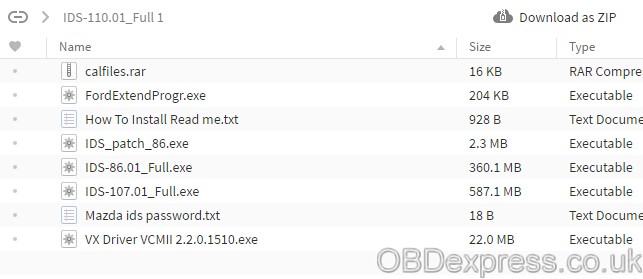
Ford IDS 110 download FREE: 100% tested

Ford IDS 110 download FREE:
ford-ids-110-download-1

ford-ids-110-download-2

FORD IDS 110.01 & cal 91 Native install 2018
ford-ids-110

ford-ids-native

IMPORTANT: Ford IDS 110 above has NOT been tested by real professionals.
If you are looking for IDS with security and relief, this is what you should have;
You can find that Ford IDS 110 is updated there.
Confirmed to work with VCM2 SP177-C1 and VXDIAG VCX NANO Ford


How to install Ford IDS 110 software:

Ford IDS 110 Install – Video Help:


Important: INSTALL V110, WITH THE INTERNET CONNECTED ON YOUR COMPUTER
SETUP V110 WILL DOWNLOAD AUTOMATICALLY, C98 CALIBRATION FOR DATABASE


Step by step install Ford IDS 110:

1- Install the ids 86 before changing the date to 1 07 2015

(hold the date 1/7/2015 ,, until you finish step 5
every time you restart your computer, check the date, if it is  on 1/7/2015)

2- install patch ( choice option 2 )

3- Make a backup of your windows system (I recommend, this is optional)

4- Open the program with the interface connected ,,( choose NON DEALER,when open program for first time ) , keep vcm turn on,on the computer.

5 – create a restore point,,,then turn off vcm of the computer

6 – Okay, now install the new version,  v110.01,, before install, 110,01 version, change the date of your computer, to the current day

7- After installing, go back to the restore point, which you created in step 5, activate this restore point, and then open the program

8- Finally, install FordExtendProgram (click right mouse button click on, run as administrator)

Done, will work in the new version


Monday, 3 September 2018

VCM 2 SP177C cannot read voltage on obd pin 16 (Solved)

VCM 2 SP177-C voltage issue:

I have one of my VCM 2 SP177C that doesn't read voltage on obd pin 16.
It does power up, but when trying to program, I get a message saying vehicle battery is low. Voltage going into vcm2 is steady 13.9v as I always use my Schumacher battery charger while programming.
The problem is inside the vcm2. Either the processor doesn't see voltage or sees a lower voltage than what comes in.
Anyone has some sort of electrical schematic of those sp177c so i could try to repair it ??
Thanks


Possible solution:

If you have new ids then car's battery needs to be like 14v.!
Get into runtime folder and edit file "batterymonitor"
Something like this::::
BatteryMonitor
[BatteryLevels]
MaxLowVoltage = 11600
MinMediumVoltage = 11500
MaxMediumVoltage = 12000
MinHighVoltag = 12800
Then try again.!

Source:http://www.obdexpress.co.uk/service/how-to-solve-vcmii-cannat-read-voltage-on-pin16.html

Wednesday, 8 August 2018

Ford IDS vs UCDSYS vs ForScan vs FoCCCus: Which best for F150 truck?

What are the “pay for use” options for Ford F150 truck diagnostics: VCM 2 IDS or UCDSYS or ForScan or FoCCCus? What is the best?

Here you go. Tips and guides for you, also incl. test reports from users.


IDS
Used to do things exactly the way the manual says – it’s pretty clear that it won’t let you color outside the lines. IDS is much more capable than Forscan, but for most people that doesn’t really matter.
You can buy a VCM II and lease out time to use IDS from websites that partner with Ford. I think it is around a $80 a day, It isn’t something most people consider and I haven’t looked into it too hard.
Hacked IDS on VMWare

A good VCMII clone (from a trusted source and not eBay) can be had for $175 and is a good choice for anyone thinking of doing firmware updates with FORScan. It's much better & faster than an ELM27 or ELS27 adapter for firmware flashing.
Forscan license and IDS License :
If you register for an extended license it can perform module programming, pats functions, cal steering angle, dpf regens any incodes required are generated
when you perform whatever task you are doing, it will ask if you want Forscan to generate code or if you want to use an external code generator, so far I have found it easier to do basic stuff on.

but IDS still has the edge for adding extra’s on like cruise and snowflake as the engineering menu gives you plain text options to add whereas Forscan has to be played with to change parameters.
If someone could do a spreadsheet comparing file details before and after pcm/bcmi software changes it would make the need for IDS nearly redundant.
If you have good luck with decent IDS crack, you’ll have no problem with any issues on Ford diagnosis and programming. The crack has no license requirement.

IDS Hardware compatibility:
IDS works perfectly with VCM2 also, genuine or good china clone. You can use WiFi for basic obd2 diagnosis, key making, ECU reprogramming and programming. Beside, IDS can work with a lot of auto diagnostic tools, such as VCM IDS3, VXDIAG VCX NANO Ford, etc.

IDS Module programming:For module initializing and updating I personally think I’d trust IDS more.
VCM2 clone (SP177-C1 or SP177-C3) is the best with module programming capabilities.
IDS Laptop and mobile compatibility:
IDS is usually used on a laptop, but someone also install the old version on an iOS mobile.
hints of where to look:
http://www.obdexpress.co.uk/wholesale/ford-vcm-ii-diagnostic-tool-wifi-card.html

UCDSYS

The UCDS adapter is also great for flashing

google it but have google translate extension setup in your browser first. They want to sell their product to more people but I feel it is best to leave that one alone too unless if you absolutely understand what you are buying and understand there are no F150 profiles for it.
UCDSYS computer compatibility:
Works on XP. You could try WIN7 8 10 as you will.
Ford UCDS Pro+ V1.26.008 test reports:
- full mode activated, access to existing sections of the software, such as: VBF Loader, Update Wizard and Direct Config.
- with 35 tokens: token only need for mileage programming & ECU chip tuning function.
- Support the reconfiguration of the car, the engine firmware stock firmware
UCDS Ford VS Ford VCM II:
Similarities:
UCDS 1.26.008 has the same data as the ids v114.
Both UCDS and VCMII can support online and offline programming.

Differences:
UCDS can do these that VCMII can't:
  1. special functions like: VBF LOADER, UPDATE WIZARD, DIRECT CONFIG
  2. UCDS support more vehicles than vcmii
  3. UCDS support odometer correction, while VCMII can't
  4. UCDS support the reconfiguration of the car, the engine firmware stock firmware, chip tuning, vcmii can't.
  5. VCMII support key programming, while UCDS can't.
  6. Price is big different.
UCDS Ford is much cheaper (25.99euro or 36.5euro) and VCMII almost $200 ( best VCMII for 159euro).


FoCCCus
- not practical for F150s but it is good to know about. Google that one too.

ForScan
- The best option regardless of potential future costs. It has the largest user base, the most support groups, and is undoubtedly the most functional. IDS can do some things better but unless if you have money to burn you are already in the best place.

Pros working for obdexpress.co.uk tested IPC firmware upgrade on Fusion (tried to install IPC from Mondeo and program it). This operation with ELS27 (fastest ELM327-compatible adapter we know) did take 1 hour 20 minutes. Same procedure on UCDS required about 20 minutes.

Note: You cant tune with forscan. You need specialized tools for that. Forscan wont read the strategy from the ECM/ECU (whatever you want to call it) and they're not a business. Its a forum of russians that reverse-engineered Ford's IDS

Test and review: started with FORScan on 2018 F150 Lariat FX4 Sport (501A) 3.5L GTDI w/ Max Trailer Tow (1/31/18 delivery).

the changes I made:
Auto Start/Stop - disable (haven't done the optional display or button yet)
Double-honk w/ key disable (gotta do this on my other Ford also!)
2 Push Panic button on Fob
GT Display option
Engine & Transmission Temps above display (FANTASTIC when I start towing!)
Fake Engine Sound (* I used the EASY version on this one, because I was skeptical the single value change would not remove other functionality. It worked, and kept the other value location I was watching unchanged.)
Forscan covers 180 modules
works with modified ELM327 adapter with HS-CAN / MS-CAN switch, they usually work.

ForScan is used to do:
Tinker with settings
clear codes and customize the electronics in the vehicle.

Price: For middle road stuff, Forscan it’s cheaper and easier.

Hardware compatibility:
Forscan is compatible with J2534 adapters incl. VCM2, MVCI, GNA600, VXDIAG, but it’s easier if you use an OBD2 connection – you use an ELS27 adapter – and unless you have the VCM for some other reason. One thing to note – Ford uses multiple CAN protocols in their modern vehicles. If you’re buying an OBD2 connection tool, make sure it can read the MS CAN signals.


Module programming:
Forscan is a backward engineered program and I brown trousered myself when I did something with it iirc.

Laptop and mobile compatibility:
Forscan can be used in a PC or a mobile (Android or iOS). The main program is for windows (with a version that runs via Wine on Linux, MacOS, and BSD)(Free) then there’s a “lite” version for android/and Iphone (paid)
To unlock the full potential of Forscan, you need the extended license(Free, valid for 3 months at a time) requires an account on the Forscan Forums. you can generate a new extended key any time.
But it is better to use a laptop on windows operating system Forscan is available for android mobile devices and others but doesn’t have full functionality


Vident
Vident iLink400 is confirmed to work perfectly with Ford cars and trucks (1996-2017) as well.This tool is good choice.
Abilities confirmed to work well:
read ECU information: confirmed!
read and clear fault codes: confirmed!
freeze frame: confirmed!
perform active test: confirmed!
special functions: confirmed!
Look here: Vident iLink400 Ford F150 vehicle list

vident-ilink400-ford-f150

vident-ilink400-ford-f150-4

vident-ilink400-ford-f150-6


vident-ilink400-ford-f150-9

Src:
http://blog.obdexpress.co.uk/2018/08/09/ford-f150-diagnostic-ids-vs-ucdsys-vs-forscan-vs-focccus/

Wednesday, 25 July 2018

How to check if you have VCM2 SP177-C best quality?

Here, obdexpress.co.uk will help you guys to check if you have the best China clone VCM2 SP177-C.

  1. Equipped yourself with PCB knowledge:
http://blog.obdexpress.co.uk/2018/07/25/how-to-confirm-a-printed-circuit-board-pcb/
  1. Disassemble your VCM2 clone unit

  1. Check components on the main board, compared with PCB displayed here:
http://blog.obdexpress.co.uk/2018/04/14/vcm-ii-sp177-c-pcb/
IMPORTANT: the VCM2 factory tries his best to improve the quality, so it’s natural to get the unit with a bit difference and the board you have might be kind of different from that in the link above.

DO NOT compare VCM2 from others with that from obdexpress.co.uk!

Received complaints from a customer that
he used the site: http://www.obd2coding.com/vcm-ii-rotunda-2-in-1-diagnostic-tool-jlr-vcm-ii-mazda-vcm-ii-ford-ids-vcm-ii-p-964.html
NOT http://www.obdexpress.co.uk/wholesale/ford-vcm-ii-diagnostic-tool-wifi-card.html
BUT he complained a lot of his VCM2 SP177-C, saying it’s fake SP177-C....
sp177-c-or-sp177-2-1

sp177-c-or-sp177-2-3
DISCLAIMER: obdexpress.co.uk is a reliable site to purchase VCM2 china clone, a man of his word to trust in. NO WORRIES! Lots of people talk about it via http://mhhauto.com/ e.g. http://mhhauto.com/Thread-VCM2-Ford-Diagnostic-Clone-Model-SP177C-SP177C1-Where-to-buy


  1. Check the source of VCM2 SP177-C:
http://www.obdexpress.co.uk/wholesale/ford-vcm-ii-diagnostic-tool-wifi-card.html

vcm2-sp177-c-pcb-3
vcm2-sp177-c-pcb-4

  1. What’s your next option if you cannot have SP177-C:http://www.obdexpress.co.uk/wholesale/ford-vcm-ii-diagnostic-tool-wifi-card.html

SP177-2  is a new VCM2 interface, released in the year 2018.
It’s produced by the same manufacturer as SP177-C1.
You can have one for tests if you like something new.
For quality and security, VCM2 SP177-C1 or SP177-C is your best option.
Why:  http://blog.obdexpress.co.uk/2017/12/27/vcm-ii-sp177-c1/
Where: http://blog.obdexpress.co.uk/2017/05/05/where-to-buy-ford-vcm2-clone-sp177c-or-sp177c1/


This blog from OBDexpress.co.uk office blog:http://blog.obdexpress.co.uk/2018/07/25/how-do-you-confirm-vcm2-sp177-c-best-quality/

Monday, 9 July 2018

Issues & Causes/Solutions: VCM 2 & Temperature

VCM 2 unit is housed in a shock resistant polycarbonate case with rubber end boots, along with an extended operating temperature and voltage range, for increased durability and ruggedness in service bay and road test environments,

BUT do ensure the VCM II is not subjected to extreme temperature or prolonged exposure to direct sunlight that may cause heating of the VCM II.

Environmental requirement: Temperature & Humidity
Operating:
VCM II unit: -20ºC to 70ºC (-4ºF to 158ºF)
Wireless USB 2.0 adapter: 0ºC to 50ºC (32ºF to 122ºF) at 10% to 90% RH non-condensing

Storage: -40ºC to 85ºC (-40ºF to 185ºF) at 10% to 90% RH non-condensing


Issues & Causes/Solutions: VCM 2 & Temperature

Issue:
VCM II turns off (shutsdown/suspends-operation, all LEDs off) immediately after being powered by the USB cable or DLC cable

Cause/Solution:
  • Verify the ambient temperature is within the acceptable operating range for the VCM II device: -20°C to 70°C (-4°F to 158°F)
  • If the ambient temperature is outside this range allow the temperature to return to the acceptable operating range and the VCM II will automatically resume operation
  • If VCM II error persists when the ambient temperature returns to its operating range, contact your regional technical support

Issue:
VCM II does not appear in the list of detected wireless devices in IDS and  its Power LED blinks at a periodic rate

Cause/Solution:
  • Verify the VCM II is connected to the DLC cable and the DLC cable is connected to the vehicle. The VCM II must be powered using the DLC cable for the wireless interface to be operational
  • Verify the ambient temperature is within the acceptable operating range for the VCM II's wireless interface: 0°C to 50°C (32°F to 122°F)
  • If the ambient temperature is outside this range allow the temperature to return to the acceptable operating range and the VCM II's wireless interface will automatically be enabled and the Power LED will stop blinking and stay illuminated
  • If VCM II wireless interface problem persists when the ambient temperature returns to its operating range, contact your regional technical support

Issue:
VCM II's Power LED blinks continuously after being powered using the DLC cable

Cause/Solution:
  • Verify the ambient temperature is within the acceptable operating range for the VCM II's wireless interface: 0°C to 50°C (32°F to 122°F)
  • If the ambient temperature is outside this range allow the temperature to return to the acceptable operating range and the VCM II's wireless interface will automatically be enabled and the Power LED will stop blinking and stay illuminated
  • If VCM II wireless interface problem persists when the ambient temperature returns to its operating range, contact your regional technical support or ask obdexpress.co.uk for help
Email: sales@OBDexpress.co.uk
Skype: obd2express.co.uk
WhatsApp: +86-18750906257

Src:http://rtqobd2.ivoire-blog.com/archive/2018/07/10/issues-causes-solutions-vcm-2-temperature-474015.html

Free Download Ford VCM2 V126 to Solve License Expired Issue

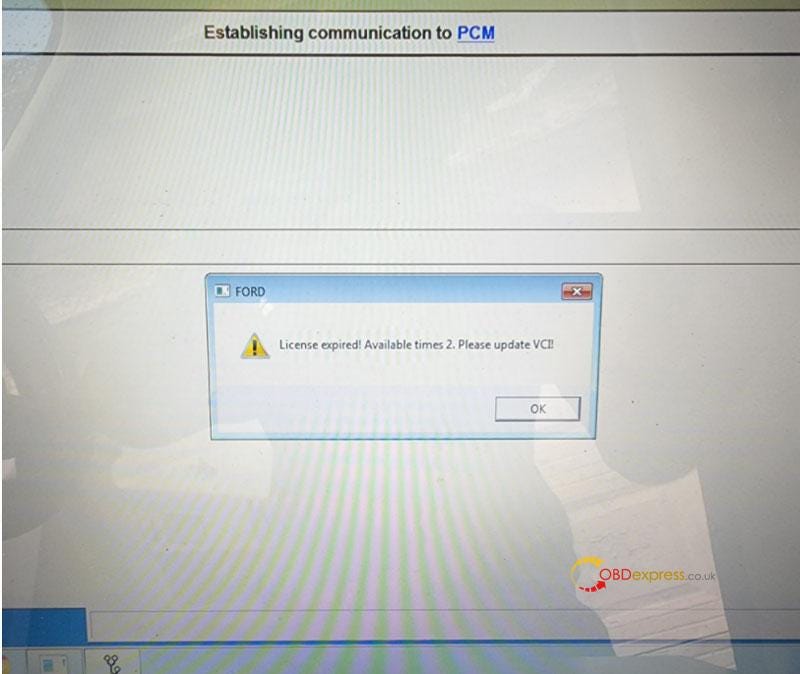
  Problem: My Ford VCM2 software has popped up an attention: “License expired! Available times 2. Please update VCI!” What does this mean?...