Shipping from UK NO TAX

Monday, 20 July 2020

Ford / Mazda IDS V118.01 Download Free and Install

Ford IDS 118.01 is verified working fine with VCM2 clone and vxdiag vcx nano by running with win7/8/10 32/64bit.
Download Free 
Ford IDS V118.01
Mazda V118.01
IDS patch for VCX Nano
 
OS: win7/8/10 32/64bit 
 
Language:  English, German, French, Italian, Dutch, Spanish, Swedish, Finnish, Danish, Norwegian, Portuguese etc
 Compatible with VXDIAG VCX NANO for Ford Mazda (USB & Wifi version ) vxdiag vcx provxdiag fullvcm2 clone (using vxdiag solution) etc.

How to install Ford /MAZDA IDS V118.01 For VXDIAG VCX NANO & VCM2  video: https://youtu.be/0UoRauT_N5E

Procedure


Open the folder "Ford Install", then "IDS-118.01_Full".


How to install Ford IDS 118.01 win7/8/10 32/64bit 1


Choose IDS language.
How to install Ford IDS 118.01 win7/8/10 32/64bit  2


Recommend you restart the computer.
How to install Ford IDS 118.01 win7/8/10 32/64bit 3


Welcome to the InstallShield Wizard for IDS.
How to install Ford IDS 118.01 win7/8/10 32/64bit 4

Agree the license agreement.

Please select the destination drive, then click on "Next".

IDS is configuring your new software installation.
How to install Ford IDS 118.01 win7/8/10 32/64bit  5


Updating the database.
How to install Ford IDS 118.01 win7/8/10 32/64bit 6

Reboot the computer.
How to install Ford IDS 118.01 win7/8/10 32/64bit  7

Open the folder "Ford Install", then "VCI_Software_1.0.0.0." to install until successfully.
How to install Ford IDS 118.01 win7/8/10 32/64bit 8

How to install Ford IDS 118.01 win7/8/10 32/64bit  9

How to install Ford IDS 118.01 win7/8/10 32/64bit  10

Open "VCI Manager (Ford) 19.04.28".
How to install Ford IDS 118.01 win7/8/10 32/64bit 11

How to install Ford IDS 118.01 win7/8/10 32/64bit  12

Open "F-M_Patch" then copy "IDSPatch" and paste it on the desktop.
How to install Ford IDS 118.01 win7/8/10 32/64bit  13You need to connect VCM2 (or vxdiag vcx nano) and car now.

Open "IDSPatch" on the desktop, choose "Dealer type: non-dealer" and Country "Botswana", then "confirm".
How to install Ford IDS 118.01 win7/8/10 32/64bit 14
Welcome to IDS 118.01 menu.
How to install Ford IDS 118.01 win7/8/10 32/64bit 15
Choose "Start New session" -> "All other", then confirm.

Operation in process.

Vehicle specification.
How to install Ford IDS 118.01 win7/8/10 32/64bit 17

Confirm.
How to install Ford IDS 118.01 win7/8/10 32/64bit 17
Self test.
How to install Ford IDS 118.01 win7/8/10 32/64bit  18
Powertrain -> Engine -> retrieve CMDTCs.
How to install Ford IDS 118.01 win7/8/10 32/64bit 19
Set the ignition switch to ON.
How to install Ford IDS 118.01 win7/8/10 32/64bit  20

Reading continuous DTCs.
How to install Ford IDS 118.01 win7/8/10 32/64bit  21

How to install Ford IDS 118.01 win7/8/10 32/64bit  22

Job is done.


Good luck!

Source:https://www.obdexpress.co.uk/service/how-to-install-and-download-ford-mazda-v118.html


Sunday, 28 June 2020

solved! Ford vcm ids 3 error “Can not load the software”?

If you are using the VCM IDS 3 V113, and the software quickloader displayed error “can not load the software”.
Ids Ford V113 01
Possible reason and solution:
You didn’t install IDS Ford – V113.
Size: 698.3 MB
Contributor: obdexpress.co.uk engineer
Security: 100% yes
OS: Win7 Win8 Win10
Language: multi-lingual
Ids Ford V113 02
Related article:

Tuesday, 5 May 2020

Top 4 Ford diagnostic programming tools: VCM2, forscan, UCDS, FoCom

2020 Top 4 Ford diagnostic programming tools in the market below:
FoCom

Top 1: VCM2 IDS Ford
IDS
You can buy a VCM II and lease out time to use IDS from websites that partner with Ford. I think it is around a $80 a day, It isn’t something most people consider and I haven’t looked into it too hard.

Hacked IDS on VMWare
A good VCMII clone (from a trusted source) can be had for £165 and is a good choice for anyone thinking of doing firmware updates with FORScan. It’s much better & faster than an ELM27 or ELS27 adapter for firmware flashing.

Good source of best VCMII clone:
Ford Vcmii Best

Top 2: forscan
ELS27 FORScan Scanner  is very good and free and works with vcm2 , Google it

Forscan work with cheap elm but no module programming, also vcm2 works with this software

Tried forscan today on mazda 6 with vcm2 clone. Worked brilliantly for what I needed. Only thing is the name reminds me of part of a dick… Lmao, probably gotta have English as 1st language to understand that one

Started with FORScan on 2018 F150 Lariat FX4 Sport (501A) 3.5L GTDI w/ Max Trailer Tow (1/31/18 delivery).
the changes I made:
Auto Start/Stop – disable (haven’t done the optional display or button yet)
Double-honk w/ key disable (gotta do this on my other Ford also!)
2 Push Panic button on Fob
GT Display option
Engine & Transmission Temps above display (FANTASTIC when I start towing!)
Fake Engine Sound (* I used the EASY version on this one, because I was skeptical the single value change would not remove other functionality. It worked, and kept the other value location I was watching unchanged.)
Forscan

Top 3: UCDS with UCDSYS software
1). Ford UCDS Clone
– full mode activated, access to existing sections of the software, such as: VBF Loader, Update Wizard and Direct Config.
– with 35 tokens: token only need for mileage programming & ECU chip tuning function.
– Support the reconfiguration of the car, the engine firmware stock firmware
Ford Ucds Pro Software Display 1
UCDS Ford VS Ford VCM II:
Similarities:
UCDS 1.26.008 has the same data as the ids v102.
Both UCDS and VCMII can support online and offline programming.

Differences:
UCDS can do these that VCMII can’t:
  1. special functions like: VBF LOADER, UPDATE WIZARD, DIRECT CONFIG
  2. UCDS support more vehicles than vcmii
  3. UCDS support odometer correction, while VCMII can’t
  4. UCDS support the reconfiguration of the car, the engine firmware stock firmware, chip tuning, vcmii can’t.
  5. VCMII support key programming, while UCDS can’t.
  6. The price is big different, UCDS Ford is much cheaper (£36.50 on obd2shop.co.uk) and best VCMII for £165.

2). UCDS Original device
This tool is powerful, can do module programming, mileage correction, chip tuning and it also work with forscan software. Assbuild data, Direct coding and much more.
Ucds Ford

Top 4: FoCom
FoCom is also good tool but it costs 100€ more than UCDS Original
I’ve used Focom, I had a £13 clone adaptor and it worked great on my Ford Fiesta, I’ve coded injectors with it, new keys and I had a problem with dashboard eeprom corrupted, and it also fixed that by pairing the ECU to it.
Focom only buy original focom adapter because the software will burn clone adapters.
Hope it helps!

Friday, 10 April 2020

Free Download & Install IDS V117 Ford VCM2

IDS V117 is tested working fine with Ford VCM2 clone, this post is available with the newest IDS software new features, free download links and how to install.

  1. IDS V117 Free download + Installation Guide
Step 1: Download Diagnostic Software, then Install Diagnostic Software:
IDS 117 Full
www.fordservicecontent.com/Ford_Content/IDS/IDS-117.01_Full.exe
FDRS 23.5.7
www.fordservicecontent.com/Ford_Content/IDS/FDRS/FDRS_23.5.7.exe

Step 2: Download VCI Software, then Install VCI Software:
VCI Software 1.0.0.7
www.fordservicecontent.com/Ford_Content/IDS/VCI_Software/VCI_Software_1.0.0.7.exe

Step 3: Download Diagnostic Software Updates (if available)
Then Run Diagnostic Software Updates:
Update IDS 117.04
www.fordservicecontent.com/Ford_Content/IDS/SoftwareUpdates/IDS-117.04.exe
See IDS Update Release Dates below:
Ids V177 Ford Vcm2 New Features 0

Step 4: Download VMS
Then Install VMS
(Optional - VCMM Users Only)
VMS v1.1.1034.0
www.fordservicecontent.com/Ford_Content/IDS/Vehicle_Measurement_System/Vehicle_Measurement_System_v1.1.1034.0.exe
Click here for VMS Manual

After Installing: Diagnostic Software Updates will pop up on Mondays and Thursdays when available.

  1. VCI firmware what's new - contain details on this new software.
IMPORTANT: Changes to VCM II and VCMM
VCM II & VCMM Device Software (“VCI Software”)
VCI Software
  • Previously, installing IDS or FDRS would install everything that is needed in order to use a VCM II/VCMM with any of the Ford diagnostic software (IDS, FDRS & VMS). There is now a new package separate from
  • IDS and FDRS, called VCI Software.
  • This VCI Software package WILL NEED to be downloaded in order to use your VCM II or VCMM, regardless of whether this is the first time you have downloaded IDS/FDRS.
  • This will improve download and installation time, as previously you were downloading and installing these components with BOTH IDS and FDRS.
  • You WILL NOT need to download and install this package every release, only when there is an update to the loaded code on the device.

VCI Launcher
When launching the VCI Manager, you will be prompted to select which device (VCM II or VCMM) you intend to use.
Only the devices of the selected type will appear in the VCI Manager. If you wish to switch device type, you will have to close the VCI Manager and select the other device.
Note: If the device is already connected via USB, you will bypass the selection screen.
Ids V177 Ford Vcm2 New Features 01
Figure 1: The VCI Launcher desktop icon

Ids V177 Ford Vcm2 New Features 02
Figure 2: The main screen of the VCI Launcher

Ids V177 Ford Vcm2 New Features 03
Ids V177 Ford Vcm2 New Features 04
Figure 3: A side-by-side comparison showing the VCM II Manger and the VCMM Manager

Changes to IDS
  • IDS now requires you to select your device type at the launch of IDS.
  •  If you wish to switch devices while in IDS, you need to navigate to what was previously the Wireless device manager (the green arrows in the upper right hand corner), select the button at the bottom left which says “VCI Type” and select which device you wish to use. You can do this at any time while in the IDS tool.
  •  Note: It is recommended if you previously pinned IDS to the task bar, that you unpin it in R115, and then re-pin it while on the device selection screen.

Ids V177 Ford Vcm2 New Features 05
Figure 4: The device selection screen when launching IDS.

Ids V177 Ford Vcm2 New Features 06
Figure 5: The new device manager screen. Note the icon in the top right, the VCI Type button in the bottom left, and the VCI Launcher selection window.

VCI Software Uninstaller
  • There is now a new component included in the VCI Software package called VCI Software Uninstaller.
  • This gives you the ability to uninstall all Ford Diagnostic components (IDS, FDRS, VMS, CFR, and VCI Software) from one central location, rather than having to uninstall each component individually.
  • This uninstaller can be accessed by going to StartFord Motor CompanyVCI Software Uninstaller. After following the prompts, you can select which software applications you wish to uninstall.
  • Note: If you are removing all components, it is recommended you select “Remove Uninstaller Data” to remove successfully all Ford components from the PC.
Ids V177 Ford Vcm2 New Features 07
Figure 6: The location of the VCI Software Uninstaller
Ids V177 Ford Vcm2 New Features 08
Figure 7: The main screen of the VCI Software Uninstaller

Best Ford VCMII with IDS V117 source:
http://www.obdexpress.co.uk/wholesale/ford-vcm-ii-diagnostic-tool-wifi-wireless-2.html
OBDexpress.co.uk Office Blog all rights reserved  Free Download & Install IDS V117 Ford VCM2

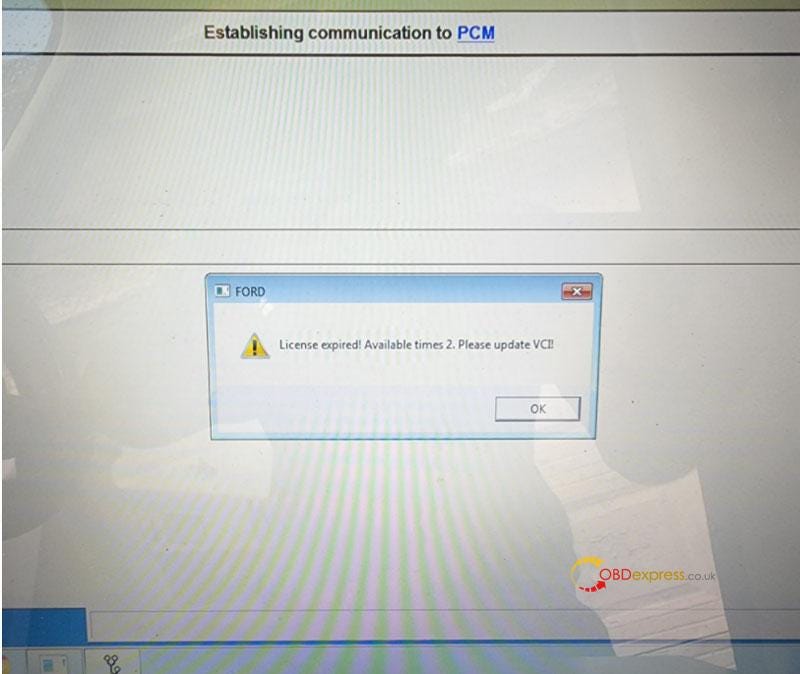
Free Download Ford VCM2 V126 to Solve License Expired Issue

  Problem: My Ford VCM2 software has popped up an attention: “License expired! Available times 2. Please update VCI!” What does this mean?...