Shipping from UK NO TAX

Tuesday, 5 May 2020

Top 4 Ford diagnostic programming tools: VCM2, forscan, UCDS, FoCom

2020 Top 4 Ford diagnostic programming tools in the market below:
FoCom

Top 1: VCM2 IDS Ford
IDS
You can buy a VCM II and lease out time to use IDS from websites that partner with Ford. I think it is around a $80 a day, It isn’t something most people consider and I haven’t looked into it too hard.

Hacked IDS on VMWare
A good VCMII clone (from a trusted source) can be had for £165 and is a good choice for anyone thinking of doing firmware updates with FORScan. It’s much better & faster than an ELM27 or ELS27 adapter for firmware flashing.

Good source of best VCMII clone:
Ford Vcmii Best

Top 2: forscan
ELS27 FORScan Scanner  is very good and free and works with vcm2 , Google it

Forscan work with cheap elm but no module programming, also vcm2 works with this software

Tried forscan today on mazda 6 with vcm2 clone. Worked brilliantly for what I needed. Only thing is the name reminds me of part of a dick… Lmao, probably gotta have English as 1st language to understand that one

Started with FORScan on 2018 F150 Lariat FX4 Sport (501A) 3.5L GTDI w/ Max Trailer Tow (1/31/18 delivery).
the changes I made:
Auto Start/Stop – disable (haven’t done the optional display or button yet)
Double-honk w/ key disable (gotta do this on my other Ford also!)
2 Push Panic button on Fob
GT Display option
Engine & Transmission Temps above display (FANTASTIC when I start towing!)
Fake Engine Sound (* I used the EASY version on this one, because I was skeptical the single value change would not remove other functionality. It worked, and kept the other value location I was watching unchanged.)
Forscan

Top 3: UCDS with UCDSYS software
1). Ford UCDS Clone
– full mode activated, access to existing sections of the software, such as: VBF Loader, Update Wizard and Direct Config.
– with 35 tokens: token only need for mileage programming & ECU chip tuning function.
– Support the reconfiguration of the car, the engine firmware stock firmware
Ford Ucds Pro Software Display 1
UCDS Ford VS Ford VCM II:
Similarities:
UCDS 1.26.008 has the same data as the ids v102.
Both UCDS and VCMII can support online and offline programming.

Differences:
UCDS can do these that VCMII can’t:
  1. special functions like: VBF LOADER, UPDATE WIZARD, DIRECT CONFIG
  2. UCDS support more vehicles than vcmii
  3. UCDS support odometer correction, while VCMII can’t
  4. UCDS support the reconfiguration of the car, the engine firmware stock firmware, chip tuning, vcmii can’t.
  5. VCMII support key programming, while UCDS can’t.
  6. The price is big different, UCDS Ford is much cheaper (£36.50 on obd2shop.co.uk) and best VCMII for £165.

2). UCDS Original device
This tool is powerful, can do module programming, mileage correction, chip tuning and it also work with forscan software. Assbuild data, Direct coding and much more.
Ucds Ford

Top 4: FoCom
FoCom is also good tool but it costs 100€ more than UCDS Original
I’ve used Focom, I had a £13 clone adaptor and it worked great on my Ford Fiesta, I’ve coded injectors with it, new keys and I had a problem with dashboard eeprom corrupted, and it also fixed that by pairing the ECU to it.
Focom only buy original focom adapter because the software will burn clone adapters.
Hope it helps!

Friday, 10 April 2020

Free Download & Install IDS V117 Ford VCM2

IDS V117 is tested working fine with Ford VCM2 clone, this post is available with the newest IDS software new features, free download links and how to install.

  1. IDS V117 Free download + Installation Guide
Step 1: Download Diagnostic Software, then Install Diagnostic Software:
IDS 117 Full
www.fordservicecontent.com/Ford_Content/IDS/IDS-117.01_Full.exe
FDRS 23.5.7
www.fordservicecontent.com/Ford_Content/IDS/FDRS/FDRS_23.5.7.exe

Step 2: Download VCI Software, then Install VCI Software:
VCI Software 1.0.0.7
www.fordservicecontent.com/Ford_Content/IDS/VCI_Software/VCI_Software_1.0.0.7.exe

Step 3: Download Diagnostic Software Updates (if available)
Then Run Diagnostic Software Updates:
Update IDS 117.04
www.fordservicecontent.com/Ford_Content/IDS/SoftwareUpdates/IDS-117.04.exe
See IDS Update Release Dates below:
Ids V177 Ford Vcm2 New Features 0

Step 4: Download VMS
Then Install VMS
(Optional - VCMM Users Only)
VMS v1.1.1034.0
www.fordservicecontent.com/Ford_Content/IDS/Vehicle_Measurement_System/Vehicle_Measurement_System_v1.1.1034.0.exe
Click here for VMS Manual

After Installing: Diagnostic Software Updates will pop up on Mondays and Thursdays when available.

  1. VCI firmware what's new - contain details on this new software.
IMPORTANT: Changes to VCM II and VCMM
VCM II & VCMM Device Software (“VCI Software”)
VCI Software
  • Previously, installing IDS or FDRS would install everything that is needed in order to use a VCM II/VCMM with any of the Ford diagnostic software (IDS, FDRS & VMS). There is now a new package separate from
  • IDS and FDRS, called VCI Software.
  • This VCI Software package WILL NEED to be downloaded in order to use your VCM II or VCMM, regardless of whether this is the first time you have downloaded IDS/FDRS.
  • This will improve download and installation time, as previously you were downloading and installing these components with BOTH IDS and FDRS.
  • You WILL NOT need to download and install this package every release, only when there is an update to the loaded code on the device.

VCI Launcher
When launching the VCI Manager, you will be prompted to select which device (VCM II or VCMM) you intend to use.
Only the devices of the selected type will appear in the VCI Manager. If you wish to switch device type, you will have to close the VCI Manager and select the other device.
Note: If the device is already connected via USB, you will bypass the selection screen.
Ids V177 Ford Vcm2 New Features 01
Figure 1: The VCI Launcher desktop icon

Ids V177 Ford Vcm2 New Features 02
Figure 2: The main screen of the VCI Launcher

Ids V177 Ford Vcm2 New Features 03
Ids V177 Ford Vcm2 New Features 04
Figure 3: A side-by-side comparison showing the VCM II Manger and the VCMM Manager

Changes to IDS
  • IDS now requires you to select your device type at the launch of IDS.
  •  If you wish to switch devices while in IDS, you need to navigate to what was previously the Wireless device manager (the green arrows in the upper right hand corner), select the button at the bottom left which says “VCI Type” and select which device you wish to use. You can do this at any time while in the IDS tool.
  •  Note: It is recommended if you previously pinned IDS to the task bar, that you unpin it in R115, and then re-pin it while on the device selection screen.

Ids V177 Ford Vcm2 New Features 05
Figure 4: The device selection screen when launching IDS.

Ids V177 Ford Vcm2 New Features 06
Figure 5: The new device manager screen. Note the icon in the top right, the VCI Type button in the bottom left, and the VCI Launcher selection window.

VCI Software Uninstaller
  • There is now a new component included in the VCI Software package called VCI Software Uninstaller.
  • This gives you the ability to uninstall all Ford Diagnostic components (IDS, FDRS, VMS, CFR, and VCI Software) from one central location, rather than having to uninstall each component individually.
  • This uninstaller can be accessed by going to StartFord Motor CompanyVCI Software Uninstaller. After following the prompts, you can select which software applications you wish to uninstall.
  • Note: If you are removing all components, it is recommended you select “Remove Uninstaller Data” to remove successfully all Ford components from the PC.
Ids V177 Ford Vcm2 New Features 07
Figure 6: The location of the VCI Software Uninstaller
Ids V177 Ford Vcm2 New Features 08
Figure 7: The main screen of the VCI Software Uninstaller

Best Ford VCMII with IDS V117 source:
http://www.obdexpress.co.uk/wholesale/ford-vcm-ii-diagnostic-tool-wifi-wireless-2.html
OBDexpress.co.uk Office Blog all rights reserved  Free Download & Install IDS V117 Ford VCM2

Monday, 9 March 2020

Solved! Ford VCM2 IDS Testman Error

Offer the solution to Ford VCM2 IDS Testman error when diagnosing F – Series Super Duty.
Vehicle: F – Series Super Duty
Engine Type: Direct Injection – Turbo
Capacity: 6.0L
Transmission: Automatic
Fuel type: Diesel
Emission level: 50 state emission

Ford scanner to use: VCM2 running IDS software

Error:
Testman error 12 56 253662

IDS Testman Error Solution
obdexpress.co.uk solution:
You have to install IDS patch, download and install the patch here:
IDS Testman Error Solution 02

Good luck!

Wednesday, 4 March 2020

How To Get VCM2 IDS V86 Activation Code?

One user feedback his VCM2 IDS V86 need the activation code to active your license (shown as following image). One question, how to get the license?
Ids Activation Code 01
Ids Activation Code 02
Ids Activation Code 03
Ids Activation Code 04
Ids Activation Code 05
Obdexpress.co.uk engineer replied:
Because the patch is not installed, there is one patch in the CD.
Ids Activation Code 06

You can also watch the below youtube video:

Good luck!
Source:http://blog.obdexpress.co.uk/2020/03/05/vcm2-ids-v86-activation-code-how-to-get-it/

Tuesday, 24 December 2019

How to change GEM settings in Fiesta 2003 ?

How to change GEM settings in Fiesta 2003 ?
I need to check or change the settings of the GEM in an Fiesta MK6 (build 2003).
Anyone knows a software tool to do this?
I have an ELM327 (clone) adapter at hand. Also an UCDS interface.

There are two software tools to do this:
  1. IDS/VCM
  2. Forscan

In details:
Ideally you want IDS/VCM for this.
At this age you can do anything to this car using a VCM with Ford IDS v86 and C81 calibrations.
Advise the best VCM2 Ford IDS V101 (with double pcb, no wifi):
http://www.obdexpress.co.uk/wholesale/best-quality-ford-vcm-ii-oem-diagnostic-tool-ids-wireless.html
Vcm2 Change Gem Settings In Fiesta 2003 01
Vcm2 Change Gem Settings In Fiesta 2003 02

Capable alternative: Forscan  
ForScan is working fine. I had this, but an old version without capability to program. Downloaded the recent version from forscan.org and all worked like charm! This is a really great tool and all for FREE!

Another working alternative: FORScan Scanner clone
Test reports: China clone bought two days ago, but DTC, direct coding and other functions work.
Forscan Change Gem Settings In Fiesta 2003 03
Forscan Change Gem Settings In Fiesta 2003 04
Forscan Change Gem Settings In Fiesta 2003 05
Source: http://www.obdexpress.co.uk/wholesale/esl27-forscan-scanner-for-ford-mazda-lincoln-mercury.html

Sunday, 22 December 2019

Best VCM II Ford (SP177-C3): SP177 & SP177-C Best alternative

Ford VCM2 (SP177 & SP177-C) out of stock recently? obdexpress.co.uk released one best Ford VCM2 (SP177-C3), it will be the best alternative.
Here is one table comparing SP177-C3, SP177, SP177-C:
 SP177-C3SP177SP177-C
PCBClick hereClick hereClick here
WifiNONONO
IDS software (in CD)V106V101V108
UpdateYesYesYes
Price€ 194€ 177€ 159
In stockIn StockIn StockOut of Stock

SP177-C3 PCB:
[caption id="attachment_23945" align="alignnone" width="600"]Hq Vcm Ii Ford Pcb Sp177 C3 Hq Vcm Ii Ford Pcb Sp177 C3[/caption]

SP177 PCB:
Sp177

SP177-C PCB:
Sp177 C 02
vcm 2

Conclusion:
SP177-C3 Ford VCM2 is the best alternative of SP177 & SP177-C. Because its internal board is made good quality, and it is not much more expensive.

Source:http://blog.obdexpress.co.uk/2019/12/21/best-vcm-ii-ford-sp177-c3-sp177-sp177-c-alternative/

Monday, 16 December 2019

Free download IDS Ford Mazda V116: VCM II & VXDIAG Nano OK

Newest version IDS Ford Mazda V116 Scan tool Diagnostics & Vehicle Reprogramming for
Ford, Lincoln, Mercury, Mazda vehicles.

Integrated Diagnostic Software (IDS) - The factory Ford Motor Company vehicle diagnostic software provides complete dealership level vehicle diagnostic coverage for all 1996 to present Ford, Lincoln and Mercury vehicles. IDS is a flexible diagnostic tool that utilizes standard computing platforms to work with Original & Clone VCM, VCM II, VCMM, VXDIAG VCX Nano interfaces.
This version can also download latest calibration files from ford server if there exist an internet connection at the moment you connect to the vehicle.
IDS V116
Ids Ford Mazda V116 02

Ford Mazda IDS V116 for VXDIAG VCX Nano:
http://www.obdexpress.co.uk/wholesale/wifi-version-vxdiag-vcx-nano-for-ford-mazda-ids.html
Mega link is not available yet.

Ford_Mzd_Patch:
https://mega.nz/#F!AooiHQrR!WsDPAmflZTrFsaKmLT7G8w

FordExtendProgr .exe
https://mega.nz/#!gREkDChZ!7Yo8_ks39I0Wr6-k8nspZauR6qMqvdfcqeHlR60GMxc

Car brand: Ford, Lincoln and Mustang
Software name: Ford IDS / FordScan ( support programming, coding, programming key)
Car model year: 2005 - 2019

Car brand: Mazda
Software name: Mazda IDS/ForScan (support programming, coding, programming key)
Car model year: 2005 - 2019

Program Features:
  1. Multi-Language: English, German, French, Italian, Spanish, Netherlands, Swedish, Danish, Norwegian, Portuguese, Slovak
  2. Reading and decoding fault codes
  3. Download the very latest calibration files from Ford server
  4. Deleting fault codes
  5. Displays system current parameters in digital form
  6. Combined displaying of data
  7. Logs keeping - writing and keeping of digital parameters in memory
  8. Support Online programming, but you must have online account, we do not provide this account.
  9. Special functions - changing of permissible settings of blocks, programming etc.
Ids Ford Mazda V116 03

System requirements:
OS: XP, VISTA, Windows 7 32 & 64 bit (Recommend Windows 7 64bit), Windows 8, 10
CPU: 1.8 GHz or greater (Dual Core Or Higher)
RAM: 2GB
HARD DRIVE: 10GB Free Disc Space Minimum
INTERFACES: Original & Clone VCM, VCM II, VCMM, VXDIAG VCX Nano

What you receive:
  1. IDS 116.02 (Software)
    2. IDS Activator (Patcher)
    3. vxdiag manager

V116 Ford VCM VCM2 IDS Full Software
http://www.obdexpress.co.uk/wholesale/ford-vcm-ids-v108.01-software.html

Enjoy
Source:http://blog.obdexpress.co.uk/2019/12/17/ids-ford-mazda-v116-update-download/

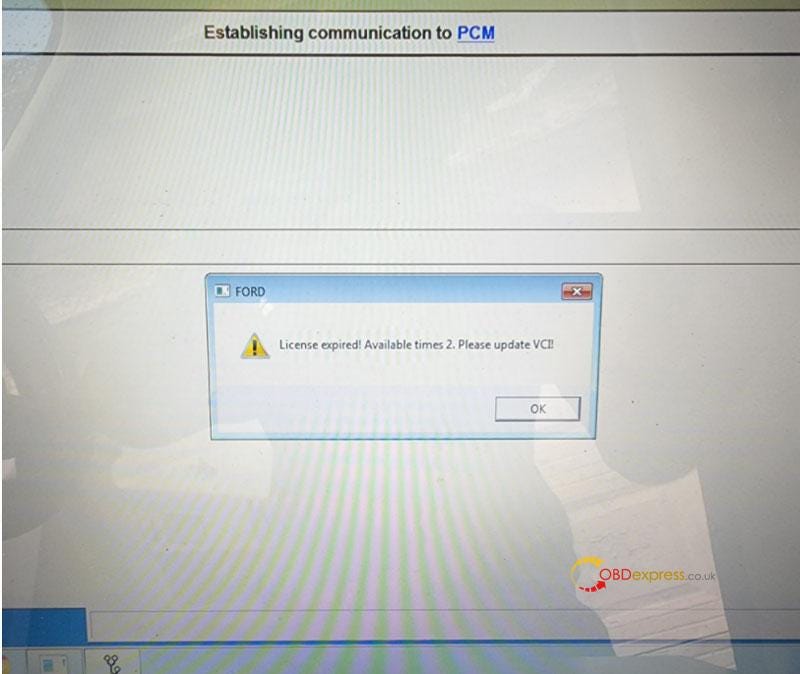
Free Download Ford VCM2 V126 to Solve License Expired Issue

  Problem: My Ford VCM2 software has popped up an attention: “License expired! Available times 2. Please update VCI!” What does this mean?...