Shipping from UK NO TAX

Sunday, 15 April 2018

(Solved) VCM2 IDS USB device, language, license, drive issues

Here are some advice and suggestion for your VCMII IDS tool ,when you meet issues like these below:
V100 VCM2 for Ford Diagnostic Tool with WIFI Wireless Card Best Quality  OBDexpress

- try with V86 versión, when I plug in the USB give me this error "unknown USB device"...
- download VMWare V93 from this fórums it is on Russian and I can't change the language...
- try to install V92 like I saw on cardcodereaders through Youtube...
But even I put 31/10/2014 it says "no valid license"

note: I have format several times and tried with W7 Ultimate, W7 starter, W7 Pro... and always the same. Never works even if I always have in the BIOS the same date: October 31th of 2014
I cant install a XP because I have no drivers for it.

Advice & Suggestion:
IDS saves information to the master boot record of the hard drive, just reinstalling windows won't fix it. Either purchase a genuine license or you have to delete the hard drive partitions to rebuild the MBR and then reinstall windows. It is much easier to acquire VMWare Workstation 10 / 11 to install a copy of Windows 7 that you will use solely for IDS as you can make backup copies in case you goof up something.
What date you use is irrelevant as long as you continue to use the same date. Start with IDS version 91 -> upgrade to 94 (Use the VCM II firmware from this version) -> upgrade to 96 (now the newest IDS is version 109). You can start with an older IDS version if you want the old calibration catalogs, using this method will require you to download any calibration files you need if you plan to do any module programming. Additionally, if you don't purchase a valid license and are using a trial your IDS cannot acquire these files automatically over the internet.

Maybe you could have a try with IDS software from Chinese. They help IDS without expiration and no license issues. Sometimes, if you have good luck, remote tech support is available also, help such as remote installation, language setup and the like


http://blog.obdexpress.co.uk/2018/04/16/solved-vcm2-ids-usb-device-language-license-drive-issues/

Friday, 13 April 2018

VCM II SP177-C1 vs. SP177-C

Folks talks a lot about China clone VCM II SP177-C and SP177-C1, saying they’re best VCM II from China. So, how much do you know about the two units? And what’s the different? Laura here will explain it from you all.

VCM II SP177C1:
VCM II SP177C:

Actually, SP177-C is same as SP177-C1.
Look here
– SP177-C1 PCB:
– SP177-C PCB:
http://blog.obdexpress.co.uk/2018/04/14/vcm-ii-sp177-c-pcb/
C1 have usb sticker for wifi. That is, only usb wifi is not included in SP177-C.
It’s only difference.

Both are Quality A version.

But vcm ii sp177-c1 is the most populous version, which supports WIFI and comes with the best PCB design. Works faster and more stable than any other units.

VCM II SP177-C PCB

China clone VCM2 SP177-C Quality A:

China clone VCM2 SP177-C Quality A

China clone VCM2 SP177-C Quality A

China clone VCM2 SP177-C Quality A

China clone VCM2 SP177-C Quality A


Wednesday, 11 April 2018

How to solve VCM II - IDS software version mismatch

This is technical support from obdexpress.co.uk for “VCM II – IDS software version mismatch” and “Not Connected to VCM II”

VCM II – IDS software version mismatch (update IDS)
The software version on the VCM II is newer than the IDS software version.
Select Tick to install the latest version of the IDS software.
Select X to cancel and then roll back the VCM II to an earlier level of software.
VCM2-ids-software-version-mismatch

Software IDS 103
ford-vcm-ii-IDS-103

VCM II Manager (Ford-VCM-II): Not Connected to VCM II


Tech support from obdexpress.co.uk:

Find this button in the VCM 2 main unit, and then press on it.
VCM-II-firmware-update-1

Connect the VCM II unit to a laptop/PC with a USB cable

Note that VCM II is only connected to the PC via a USB cable, not connected to the car via an OBD cable

Press the button until the power is connected and all the lights are lighted.
VCM-II-firmware-update-2

Go to the START menu, then Bosch
Open Ford VCM II Manager, then go to VCM II Update for recovery
VCM-II-firmware-update-3

Hope it’s helpful to you.
Good luck!
http://blog.obdexpress.co.uk/2018/04/12/vcm-ii-ids-software-version-mismatch/

Tuesday, 10 April 2018

How to use D-Link wireless adapter for VCM 2 WiFi

This is how to configure a wireless VCM II unit using the supplied D-Link wireless adapter shown as below:
d-link-wireless-adapter-for-ford-vcm-ii-

This configuration allows the computer’s internal wireless card to connect to the internet while the supplied D-Link USB wireless adapter, installed in the computer, communicates with the VCM II.


INSTRUCTIONS: FIRST TIME CONNECTING WIRELESS TO THE VCM II (DEFAULT) (POINT TO POINT)

  1. Shutdown the IDS application.
  2. Disconnect the VCM II USB cable from both the computer and VCM II.
  3. Insert the supplied D-Link wireless adapter into an unused computer USB port.
A Windows “Pop-up” may appear if the device driver is being installed.
  1. Connect the VCM II to the vehicle using the DLC cable.
The VCM II’s wireless feature is enabled when connected to the vehicles 16-Pin DLC connector. It may take up to 30 sec for the wireless feature to be enabled.
  1. Startup the IDS application.
  2. If this is the first time IDS has been started, you will be prompted for preferences and settings. You may also be prompted for a license key or to validate your IDS license. For more details on IDS licensing, see the IDS Users Manual.
  3. If a VCM II software update is available, you will be prompted to connect the VCM II USB cable to perform the update.
  4. Click on the “Device Selection” tab
    VCMII-D-LINK-WIFI-configuration-1
    located at the top right corner of the IDS screen (see Figure 1: Device Selection Screen).
If the “Device Selection” tab is not visible, connect the VCM II to the computer using the USB cable.
VCMII-D-LINK-WIFI-configuration-2

  1. Select the VCM II that you would like to connect to.

WARNING: Verify the VCM II serial number belongs to your device. Failure to do so may disrupt other VCM II’s and risk personal injury.

  1. Check the “Wireless Default” box to make this VCM II your default. By specifying a default, you will no longer need to visit to this screen unless you want to connect to a different VCM II.
  2. The VCM II is ready to operate with IDS wirelessly.

Now you have VCM II with D-Link adapter for wireless diagnostic as VCM II SP177-C1 WiFi version.

Monday, 2 April 2018

Ford IDS 109 download, install, activate, reviews, FAQs

Updated on 03-04-2018. Here are Ford IDS 109 reviews with answers
for
questions frequently asked. You can get ids 109
link
here

Ford IDS 109 Where to:
Free shipping
100% tested on Windows 7 64bit: No issues!

How to install and activate Ford IDS 109 :
Free installation and activation service via obdexpress.co.uk
(No need install and activate SW yourself)
ford-ids-109-software-download(1)

Ford IDS 109 Review:
Confirmed!
109 start and work, VCM1 clone (but oldest one), Windows 7
Installation
from
clear Windows start, and
for end
friendly, responsive, fast

make a great install to me on win 7. all I had to do is drink coffee during install. works perfect no limitation

Trusted seller. Installed and activated without problems. V109 + incode calculator. Windows 7 64bit and VCM1 original. Very happy.

Online programming work %100

Tested with VXDIAG VCX NANO for Ford. Good!


Ford IDS 109 FAQs:

VCM 1 is compatible?
Yes, it can work with Ford VCM 1 clone

Works good with VCM2 clone?
I have Chinese clone VCM2 SP177-C1 and it works great with impressive speed. I would definitely recommend this guy.

Hi how about Online ? It will be work with cloned VCMII ?
can do
online ,
work with original and clone VCMs

So just to confirm the testman.exe and other DLLs in the Runtime folder are all v109? I’ve found that many other hacked versions are build using v106 and not all features work with 2017+ vehicles. 
i

know ,
some
softwares

can not
work with 2017
cars ,

i
know what to do for supporting 2017
cars .

i
will change some files for
it .

What is the price??? and where to?
65.99 euro with free shipping, installation & activation service

Someone please test 2017 f150 key programming north america model
For F150 2017 need minimum IDS and NASTF account !!!

I have a vmware version of IDS 108.07, that appears to be built on 106 based on the file versions of a lot of the DLLs in the Runtime folder. Using a genuine VCM II with the 2.4.73.49 firmware, I canNOT do TCM module programming on a 2017. 
Never tried TCM on 2017+ but that’s a possibility.
All hack I’ve seen are based on v86, v101 or v106.
Never seen a hack based on v109 executables and DLLs .. that’s why I’m asking but he won’t answer that question.

Src:

Sunday, 1 April 2018

(Solved) VCM2 WiFi only work with v86, not newer IDS

Thread about VCM2 WiFi on newer IDS software
I think its pretty clear why it doesn’t work now from watching the serial connection to the VCM’s output….The drivers aren’t loading on the VCM. That was what I was pointing out.


My wifi works only with v86 not with any other versions but haven’t worked out which file to swap

He alluded to the key being getting the v86 VCI to work with the newer VCM firmware in another post. I was able to beg v86 VCI to talk to v101.04 VCM firmware without saying it needed to upgrade the other day but not to my benefit :/
I am currently getting a laptop deployed that has more than one USB 2.0 port. I tried using 3.0 by setting the vmplayer to USB3 mode adding adding the driver on the guest OS for the USB 3 host controller which all went fine but the Host OS isn’t passing devices through to the vmplayer guest OS that I plug in to USB3 ports :/
I never thought having a newer model laptop would hurt me
And…… Physical hardware with v86 installed directly on it worked just fine for WiFi! Gonna grab the individual VCM’s config file from the VCI manager and see if that works in 101.04 The file is generated when you first plug in the VCM to software for the first time.

Another note you’d better read:
it wont work , if it is detected that you are trying to use an older version VCI Manger , the setup installs the vci manager from another location , might work upto about 97 version , but deffo not in 100 or 101 version, to get and older vci manager to work in 100 plus version requires quite a lot of work to be fair .
swapping individual files wont work either, thats why the firmware patch only worked to 97 version, after that the vci manager changed the install location of the firmware files and stuff, look at your two different setup’s 86 – 101 to see what i mean.

Advice form experts:
Better use genuine VCM2 or HQ cloned VCM2 SP177-C1, no issues of WiFi & IDS compatibility.
Easy to find out a genuine Ford VCM2 unit via Google;
But attention please when you wanna go to a VCM2 clone -READ IT:
Where to buy Ford VCM2 clone SP177C or SP177C1


Src:

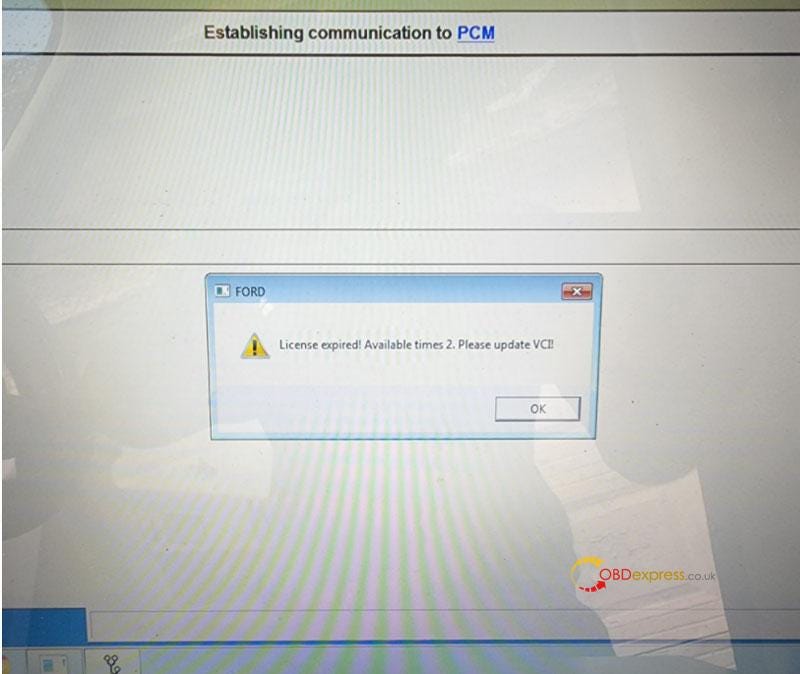
Free Download Ford VCM2 V126 to Solve License Expired Issue

  Problem: My Ford VCM2 software has popped up an attention: “License expired! Available times 2. Please update VCI!” What does this mean?...