Shipping from UK NO TAX

Friday, 19 January 2018

Ford IDS V108.01 download, install and activate – fits VCMII clone or original

Multilingual Ford IDS V108.01 Full Software is tested working flawlessly on win xp /7 32 64 bits with VCMII clone or original, and features in online programming.

Multilingual Ford IDS V108.01

Ford IDS 108.01 features:
Perfectly compatible with XP 7 32 64bits
Multi Language available: English, French, Spanish, Italian, Polish, Portuguese etc.
Online programming is working great if you have online account.

Ford IDS V108.01 is tested working with:
– Ford VCM II clone (Best one)
– Ford VCM II original (search on Google)

Ford IDS V108.01 Full Software download, installation & activation:
There is no software cd and download link, after you complete payment, the supplier will help installation & activation with TeamViewer.

Then, where is good place to have Ford IDS V108.01 Full Software with installation & activation service?
You can go to

Ford IDS V108.01 Full Software is confirmed to perform these functions:
V108.01 IDS is able to download the latest calibration/software files from ford’s server if your internet connection is available at the time of connecting to vehicles. (Confirmed)
Read and decode fault codes (Confirmed)
Delete fault codes (Confirmed)
Display the system current parameters in digital form (Confirmed)
Combined displaying of data (Confirmed)
Logs Keeping: writing and keeping of digital parameters in memory (Confirmed)
Special functions: changing of permissible setting of blocks, programming etc. (Confirmed)


Monday, 15 January 2018

Old VCM2 FW & New IDS SW compatibility

Topic:VCM2 firmware and IDS software compatibility


It works perfectly using IDS 96.05 with firmware 2.1.119.3 from older IDS version. But even with changing the serial number, I have not been able to get it to connect to vehicle PCM with anything newer than that older firmware to use IDS 97 or 98 – Preferably 98.04 that came out today which still uses the 2.3.85.7 firmware.
IDS 97/98 don’t support that older firmware anymore so I can’t use it with the newer IDS versions. (Additionally, I changed the serial before updating to one that I know is legit (actually tried a couple different ones), it will update and install fine.) But if I update the firmware on the device to 2.3.85.7 to use IDS 97 or 98 it will update. It will show up in IDS as connected. When you actually go to use it, you can hear the relays click on as normal, but the unit will not establish a connection to the vehicles PCM to be able to use it.

Searched a lot…

And here, post what I did differently so others can benefit from my discoveries

1- Boot in recovery mode, reflash ford v86 (2.1.1.5 if my memory is right?)
2- use the test mode hack and access the web interface. change serial number to a good one.
3- reboot in recovery, reflash (still in v86) to make the serial change persistent.
4- now I have a working Ford VCM2 with a good serial that can work in v98. but before upgrading, let’s put a hacked recovery firmware in it. re-enter test mode via test mode hack.
5-follow the steps cautiously to flash hacked firmware.
Now the device will flash to ford or mazda IDS v98. the device will not be detected at first (say you used ford IDS first). to switch from ford to mazda :
1- boot VCM in recovery mode
2- change device type using web browser
3- reboot VCM again in recovery mode
4- Launch Mazda IDS and reflash the VCM.
The same steps are used to flash back into ford firmware. I have not tried folder swapping and using a single firmware for both programs but I bet it would work. Because of the nature of my work, I can live with reflashing between both programs. they reside on the same HDD in a triple boot setup. the third OS is used for something else. I use deep freeze for my ford license works like a charm. Mazda doesn’t need anything done, only a valid device type and serial.
On a side note, I tested the device in 3 different win7 environments, and it just refuses to work in 2 of them. the ETAS driver keeps acting weird and sometimes detects an unknon device. on the 3rd one the driver is happy to see a good VCM2. Go figure… I setup both IDS programs in Win XP intances and it works fine.


Sunday, 14 January 2018

How to change Ford VCM2 serial number

I have figured out how to change the serial number of the VCM2 as well as enter test mode, and get a root shell on it.

You’ll need a microSD card for this to work.
1. Use IDS 86.
2. Recover your VCM2.
a. Describing how to recover is beyond the scope of this post. Search the forums for instructions.
b. After recovery your VCM2 should be at VCM2 FW version 2.1.1.5.
3. Wait about 90 seconds after the VCM2 beeps before proceeding. We are waiting for the SD card to be populated.
4. Unplug the VCM2 and eject the SD card.
5. Mount the SD card with a linux machine.
6. On the SD card open ‘apps/vci-diags/hwtest-scripts/self-test.sh’ for editing.
7. Add the following line to the file:
touch /etc/vci/config/testmode
8. Cleanly unmount the SD card and insert it back into the VCM2.
9. Plug the VCM2 unit into the computer and wait 90 seconds past beep before proceeding.
10. Launch IDS.
11. Go to system utilities
ford-vcm2-hacking-1
  1. Select ‘Launch Monitor Tool’ and confirm on the pop up.
    13. Select ‘Run System Diagnostics’ > ‘Next’ > ‘Test a VCM II Module’ > ‘Next’
ford-vcm2-hacking-2
  1. Once the test completes unplug, wait a couple seconds, and then re-plug the VCM2 into the computer.
    15. Wait about 15 seconds past when the VCM2 beeps and point your browser to http://192.168.171.2
ford-vcm2-hacking-3
You are now in the test mode web server.
a. To set a new serial number select ‘Set New Serial Number’ and proceed with serial number setting.
The default serial number is: 1211-31605352
b. To get a root shell Telnet to 192.168.171.2 you will be dropped to a root shell without providing login credentials.
c. To stay in testmode at next reboot select ‘Set Repair Test Mode’. This has to be done once per boot or you will have to go through this whole process to re-enable test mode.

Here Be Dragons:
To those who would go poking around, tread carefully. I accidentally ran cgi-bin/total-reflash and wiped my VCM2.
My bootloader was still intacted and available on pins 24 & 25 of the HDL26-PL-B connector.

Posted by ColtB45
src: https://mhhauto.com/Thread-VCM2-Hacking
YOU ARE TRYING ON YOUR OWN RISK!


Thursday, 11 January 2018

(Solved) VCM2 firmware is newer than IDS software

Recently,OBDexpress has received some question about Ford VCM2 firmware downgrade,and obdexpress found the same problem in the mhhauto OBDII scan forum.

Here you are:

I just get VCM2 and instaled IDS v86 and when I start sw error I get that VCM firmware is newer then IDS sw.
How to do?
Customer solutions from the MH forum:

Press and hold reset button after that insert usb to pc still hold reset button when you will hear beep after that release reset button.

If it does not works….

Try to use this Ford VCM II Software setup v2.1.119.3. I have Chinese clone Ford VCM II and working with Ford IDS v86, Mazda IDS v91 and with JLR SDD v138 with this software setup too. My VCM have no problem with update downgrade I had installed Ford IDS v95 after that v86 and no problem update downgrade. When I installed JLR SDD v138 I had to update VCM to this version and after that was not functional with Ford IDS v86 after installing this setup was all functional.

Ford VCM II v2.1.119.3:
(RUN v2.1.119.3 on a computer without any IDS or SDD
Start VCI Manager and press update /start
you can do this without press the button on vcmii)

When I want update or downgrade VCM I have to only connect VCM with PC not need connect VCM to OBD. I have installed this softwares on VMware each separately. Each with new clean windows xp. I have not installed newest Ford IDS v95 for example because I don`t know how to freeze system still after 5 days license k.o.  But I had installed this new version Ford v95 and worked this new software update without problem. I install V94 and after that IDS said me is new version v95 I downloaded it and it worked.


I am using V94, and I was told I need OSCH VCI MAMAGER2.1.119.3, NOT 2.1.19.19

TizWazsaid, “IF YOU ARE USING VERSION 94, YOU WILL HAVE WRONG VERSION BOSCH VCI MAMAGER , IT WILL BE 2.1.19.19
YOU NEED 2.1.119.3
you need to press the reset button on the vcmII WHILE CONNECTED TO 12V, then when you see all lights flash at once on the vcmii, you put to usb , wait for beep release reset button on VCMII and start VCI MANAGER.
BUTTONS IN VCI MAAGER SHOULD COME ALIVE BUT YOU NEED TO DO IT WITH VERSION 2.1.119.3
SO IN ids 94, you can go to program and features and uninstall version 2.1.119.19 , reboot and install 2.1.119.3
to install MAZDA IDS With ford VCMII”

I downgrade my vcm2 firmware to work with Ford IDS v86, and now ford is ok for me.
I followed a youtube video and I installed (on free IDS PC) Mazda IDS v88 (because I readed that v88 will work with same firmware as ford v86) . Changed Bosch VCI manager files from ford into mazda and now when start vcm manager ask me to update to newer version , but I not wanna update and skip that.
When start Mazda IDS also told me that must update, so which version of mazda will work with same ford v86 fw? Must I search for Mazda v86??

Note: the version software is unimportant , its the ETAS version that matters .
2.1.119.3
you use the SAME one across all JLR, MAZDA, FORD.
IF ORIGINAL VCMII YOU CAN USE 2.1.119.19

If clone Ford VCMII, USEthat etas version for your FORD, MAZDA, and JLR


Enjoy and good luck!

(BIG THANKS to laco210 and TizWaz)

Tuesday, 9 January 2018

How to use Mazda VCM 2 and IDS software

Vcm2 model:SP177-C1

Mazda IDS installation: Success

Issues: Mazda ids can see the vcm but it won’t connect to the car.

What tried:
I tried the old trick which involves copying ford’s vcm manger files to the Mazda folder.
Mazda ids can see the vcm but it won’t connect to the car.
I tried it with latest Bosch vcm manager and ford ids 104.1 and Mazda ids 103.5
My ford and Mazda ids are not on the same partition so I simply copied the file from a partition to the other one, taking care to rename the folder to Mazda-vcm…..


Solved!!!!!!
All I did was install Ford 2.3.85.7 software and uninstalled Mazda vcm 2 software then reboot and it’s working

Ford vcm 2 patch for Mazda ids:


Wednesday, 27 December 2017

VCM II SP177-C1

What is VCM II SP177-C1:
VCM II SP177-C1 is the best Ford VCM2 China clone with item number 177.

It’s originated from MHH forum and indicates vcm2 units from obd2express.co.uk (now, it’s updated to obdexpress.co.uk)
vcm-ii-sp177-c1
vcm ii sp177-c1 link:
vcm ii sp177-c1 reviews:

vcm ii sp177-c1 basic info:
Hardware: 2017 version
Software: Ford IDS V100

WiFi: supported

Update: Free Ford IDS software download via Mega link though http://blog.obdexpress.co.uk/

Quality: Best

Item numberSP177SP177-1SP177-CSP177-C1SP177-C2SP239-BSP10-DSP10-T
WIFI adapterNONONOYESYESNONONO
SoftwareV101V101V100V100V97V97IDS V86 JLRV145IDS V86 JLRV145
SoftwareFordFordFordFordFordFord and MazdaFord, mazda, Land rover, jaguarFord, mazda, Land rover, jaguar
QualityOrdinaryBAABOrdinarystablestable
VMwareYESYESYESYESYESYESNONO
UpdateYesYesYesYesYesYesNONO
pin code calculatorNONONONONONOYESYES
vcm ii sp177-c1 is the Quality A version, supports WIFI and comes with the best PCB design. Works faster and more stable than any other units.

vcm ii sp177-c1 look:
best-ford-vcm-ii-diagnostic-tool-wifi-wireless-version-1 best-ford-vcm-ii-diagnostic-tool-wifi-wireless-version-2 best-ford-vcm-ii-diagnostic-tool-wifi-wireless-version-3 best-ford-vcm-ii-diagnostic-tool-wifi-wireless-version-4 best-ford-vcm-ii-diagnostic-tool-wifi-wireless-version-5 best-ford-vcm-ii-diagnostic-tool-wifi-wireless-version-5

That’s all for why VCM II SP177-C1 is the best China clone VCM2.
Source:

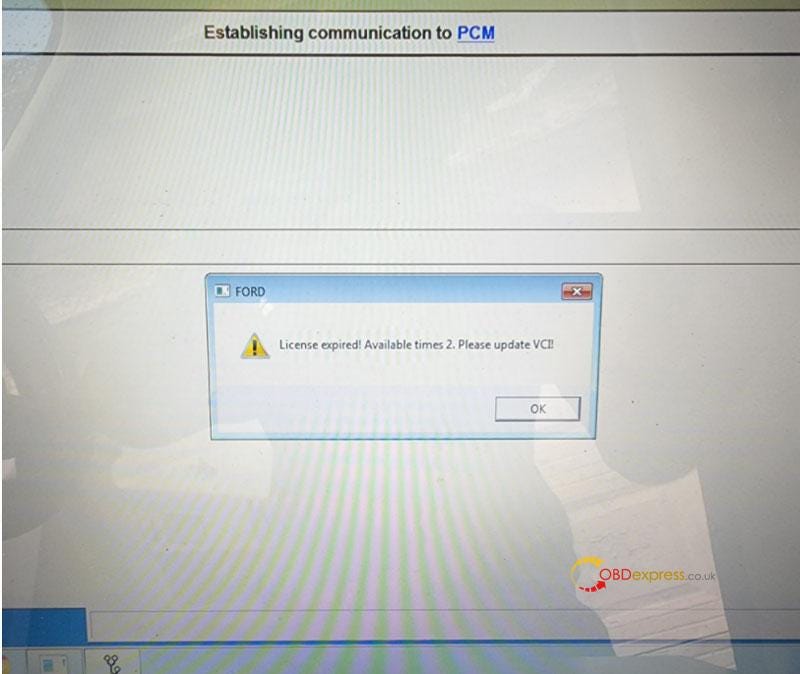
Free Download Ford VCM2 V126 to Solve License Expired Issue

  Problem: My Ford VCM2 software has popped up an attention: “License expired! Available times 2. Please update VCI!” What does this mean?...