Shipping from UK NO TAX

Showing posts with label FORD VCMⅡ. Show all posts

Wednesday, 5 August 2020

How to solve laptop wont connect to VCM2 V86?

Question: I’ve got a VCM 2 that’s using the v86 program that’s about 4 years old.
Took me a while to get it working but has worked ever since on a couple of Van’s and 2 of my fiestas now the laptop won’t connect to the VCM even though it makes the bong bong sound when I plug something into the USB port.
The lights on the VCM are a little random.
The laptop light will light when it’s only plugged into the van and the standby light is the only one that lights when the laptop is plugged in.
Tried a different USB laptop to VCMII and it’s still the same.
If I get a new one will it just plug into laptop and work or will I need to set it up?
Also what at the Forscan things people use, would one of them be better for resetting the learned values on an mk7 euro5?

laptop wont connect to VCM2 V86 solution 1

laptop wont connect to VCM2 V86 solution 2

Solution:

  1. Try resetting the vcm by pushing the tab beneath the end cap, the springy part above the USB slot in the pic, and then updating the drivers again.
laptop wont connect to VCM2 V86 solution 2


  1. If you have Forscan downloaded on your laptop you can try using the vcm as the interface for Forscan if your vcm is bricked and I hope it’s not it works better than the elm as it will automatically switch between high/low can.


ford vcm2 is also j2534 pass-thru interface,vcm1 is not, and VCM module is for measurements using ford ids, and this forscan software runs j2534 protocol devices as per j2534 vcm2.


FORScan can only work with VCM using the J2534 Passthru interface. VCM 1 doesn’t support J2534 Passthru so can be used with IDS only. VCM 2 and VCMM (next model after VCM2) work fine with FORScan.


  1. Answer to the question” If I get a new one VCMII will it just plug into laptop and work or will I need to set it up?”

– After you plug the new VCMII to the computer, open the device manager, if you can’t see the update button, please directly use the IDS. If you can see the update button, just click on it to update before using IDS.


Here obdexpress.co.uk chief engineer recommends you one best VCMII clone:

https://www.obdexpress.co.uk/wholesale/best-quality-ford-vcm-ii-oem-diagnostic-tool-ids-wireless.html

Saturday, 7 September 2019

FORD IDS V114.06 MAZDA IDS 114.04 Native Installation

  1. Higher version at higher price
FORD IDS V114.06 +(Online+Offline) Calibration Native Install with Remote Support
IDS Release Level IDS-114.06
MAZDA IDS 114.04

fırst not work same pc
price each soft 107 euro
2x 10⁷ euro =214 euro both price 210 euro
FORD IDS V114.06 MAZDA IDS 114.04

FORD IDS V114.06 MAZDA IDS 114.04


  1. Working version at cheaper price
Ford IDS V114.03: 82.99 euro (at a lower price when they have anniversary sale)

Mazda IDS version depends on the VCM2 hardware
VCM2 (sp239-b) & fly SVDI FVDI for Ford Mazda (sp313): Mazda IDS v114.0

Native installation not vmware or other virtual software.
you can use it unlimited time.
installation and activation via team viewer only.
support online programming function also included calibration file.
also included incode calculator for old model key programming or module installation new series need a dealer account.
works on all vcm1-vcm2- original or clone…….
Functions:
* Automatic vehicle recognition
* Read & Clear Diagnostic Trouble Codes (DTCs)
* Live Data-stream with Recording & Playback Functions for Main ECUs
* Guided Fault Finding
* New Software Re-flash for Existing ECUs
* Programming & Installation of new ECUs (PCM, ABS, Instrument Cluster, Air Bag, Fuel Pumps, etc.)
* Program New Keys (for additional fee)
* Injector Coding
* Set, Adjust or Remove Speed Governors
* DPF Regeneration
* Brake Bleeding
* Steering Angle Resets
* All Other Offline and online Dealer Functions

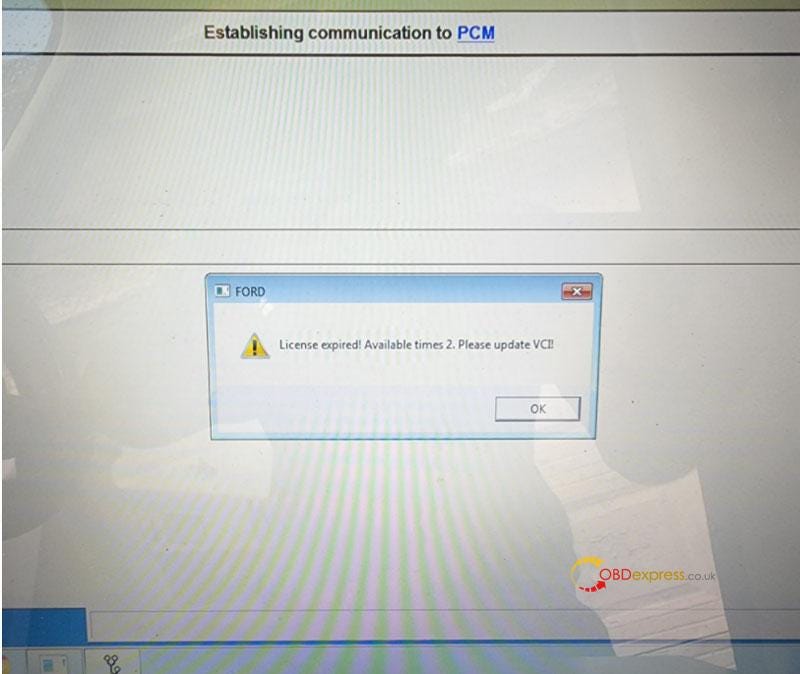
Free Download Ford VCM2 V126 to Solve License Expired Issue

  Problem: My Ford VCM2 software has popped up an attention: “License expired! Available times 2. Please update VCI!” What does this mean?...